Welcome to Python Programming for Data Engineering by HitaVir Tech!
This hands-on codelab is built for complete beginners from a non-technical background. Every concept is explained in plain English first, then shown through real Data Engineering examples. You will not just learn Python — you will learn the way data engineers actually use it.
Promise to the learner: If you can use Excel and save a file, you can finish this codelab. We define every term, show every command, and explain every line.
What You Will Learn
- Python fundamentals (variables, data types, control flow, functions)
- Data structures used in pipelines (lists, dicts, sets, tuples, JSON)
- File handling for Data Engineering (CSV, JSON, log files)
- Error handling and logging for production pipelines
- pandas for data cleaning, transformation, and aggregation
- Building a complete ETL (Extract-Transform-Load) pipeline from scratch
- Interview-ready Python concepts for Data Engineering jobs
What You Will Build
A complete Sales Data ETL Pipeline for HitaVir Tech:
  Raw CSV Data → Extract → Clean → Transform → Aggregate → Report
       │            │        │          │           │          │
  sales_raw.csv  Load file  Fix nulls  Add cols   Summarize  output.csv
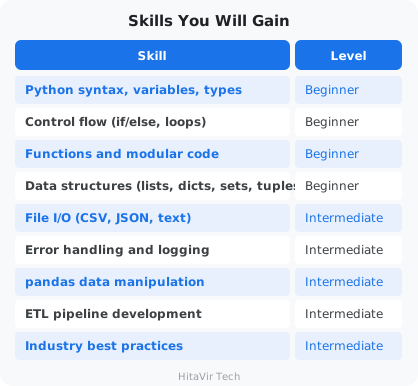
Skills You Will Gain
Why Python for Data Engineering?
Python is the number one language in Data Engineering because:
- Every tool supports it — Spark, Airflow, Databricks, AWS Glue, dbt
- Massive library ecosystem — pandas, numpy, PySpark, SQLAlchemy
- Easy to learn — readable syntax that looks like English
- Industry standard — required in 95% of Data Engineering job postings
- Automation — script anything from file processing to API calls
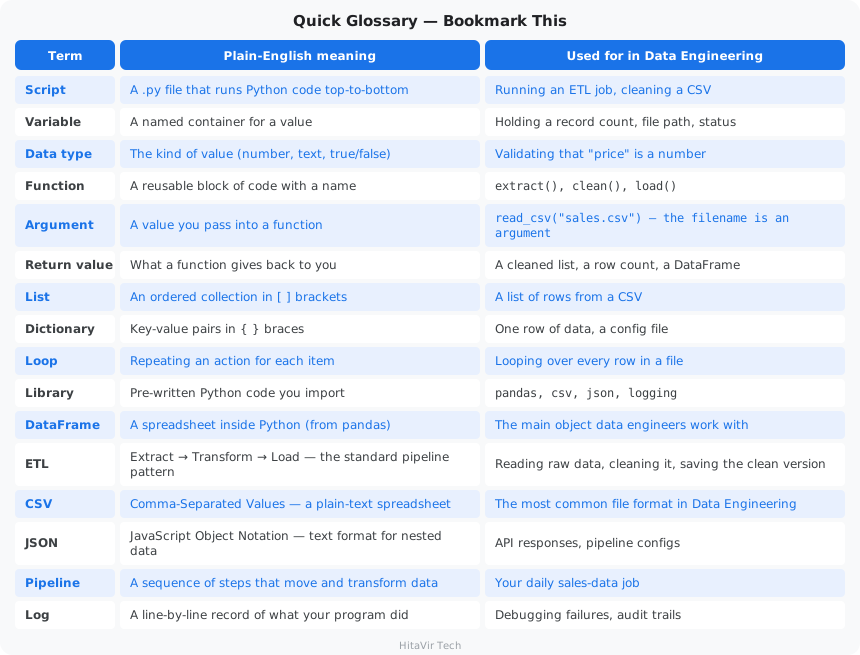
Quick Glossary — Bookmark This
You will see these words throughout the codelab. Read them once now; they will sink in as you practice.
Estimated Duration
5–7 hours total — go at your own pace. Each section builds on the last.
HitaVir Tech says: "Python is not just a programming language — it is the glue that holds modern data platforms together. Master it, and every data tool becomes accessible to you."
What You Have Learnt on This Page
By the end of this page you should be able to confidently:
- Explain why Python is the #1 language in Data Engineering
- Define every term in the Glossary (script, variable, ETL, DataFrame, etc.) in plain English
- Describe what you will build by the end of this codelab — a real Sales ETL Pipeline
- Estimate your study plan around the ~5–7 hour total duration
PEP 8 — The Style Promise You Make Today
This codelab is built on top of PEP 8, the universal Python Style Guide. From this page onward, you commit to:
- Treating PEP 8 not as a suggestion but as the bare minimum of professionalism
- Writing code that humans (your teammates) can read first, machines second
- Running
blackandflake8on every script before you call it "done"
Inspiration for the road ahead:
"Programs must be written for people to read, and only incidentally for machines to execute." — Harold Abelson, Structure and Interpretation of Computer Programs
Required
- A computer running Windows 10 or 11
- Administrator access (to install software)
- At least 2 GB free disk space
- Internet connection (for downloading packages)
No Prior Knowledge Needed
This codelab assumes zero Python experience and zero programming background. We start from installing Python itself.
Helpful but Not Required
- Basic familiarity with the command line (covered in our Linux Basics codelab)
- Understanding of what data and files are (you already do — every Excel sheet is data!)
HitaVir Tech says: "If you can use a calculator and save a file, you are ready to learn Python. Everything else, we teach you step by step."
What You Have Learnt on This Page
By the end of this page you should be able to confidently:
- List the hardware and software prerequisites (Windows 10/11, 2 GB free disk, internet)
- Explain that no prior programming knowledge is required to start
- Recognise that the only "must-have" skills are using a computer and saving a file
PEP 8 — Set Yourself Up for Strict Style From Day One
Before you write a single line of Python, decide that every file you create in this codelab will follow PEP 8. The earliest habits are the strongest.
- Plan to indent with 4 spaces (never tabs)
- Plan to keep lines ≤ 88 characters wide (the Black formatter default)
- Plan to install
blackandflake8in the very next page
Inspiration for the road ahead:
"The expert in anything was once a beginner." — Helen Hayes
What is an "environment"?
An environment is the set of tools your code runs inside — Python itself, an editor to write code in, and a sandbox to install libraries. We will set up all three on Windows.
Let us set up a professional Python development environment.
Step 1 — Install Python
Go to https://www.python.org/downloads/ and download the latest Python 3.x installer.
CRITICAL during installation:
- Check the box that says "Add Python to PATH" (at the bottom of the first screen)
- Click "Install Now"
What does "Add to PATH" mean?
PATH is a list of folders Windows searches when you type a command. If Python is on PATH, typing python anywhere in any terminal works. If you skip this, Python will be installed but invisible to your terminal.
If you miss the PATH checkbox, Python commands will not work — reinstall and check it.
Step 2 — Verify Python Installation
Open Git Bash (or Command Prompt) and run:
python --version
Expected output:
Python 3.12.3
Now check pip, Python's package installer (it ships with Python):
pip --version
Expected output:
pip 24.0 from ... (python 3.12)
What is pip?
pip is the tool that downloads and installs Python libraries (extra code other people wrote that you can reuse). Think of it like the App Store, but for Python code.
Step 3 — Install VS Code
VS Code is a free code editor from Microsoft. Download from https://code.visualstudio.com/ and install with default settings.
Why VS Code?
A code editor is a souped-up Notepad: it color-codes your Python so it is easier to read, catches typos as you type, and runs your scripts with one click.
Step 4 — Install the Python Extension for VS Code
- Open VS Code
- Press
Ctrl + Shift + X(Extensions panel) - Search for "Python" by Microsoft
- Click Install
Step 5 — Set VS Code to the Dark+ Theme
Every code example in this codelab is written and explained against the Dark+ (default dark) theme. Set the same theme so what you see on screen matches what you see here.
- Press
Ctrl + KthenCtrl + Tto open the Color Theme picker - Choose "Dark+ (default dark)" (or "Default Dark Modern" on newer VS Code versions)
- Press
Enterto confirm
Why dark theme for long study sessions? Less eye strain, better contrast on syntax colors, and it matches every screenshot in this codelab.
What Your Code Will Look Like in VS Code Dark+
When you paste any Python code from this codelab into a .py file in VS Code, the syntax highlighter colors it like this:
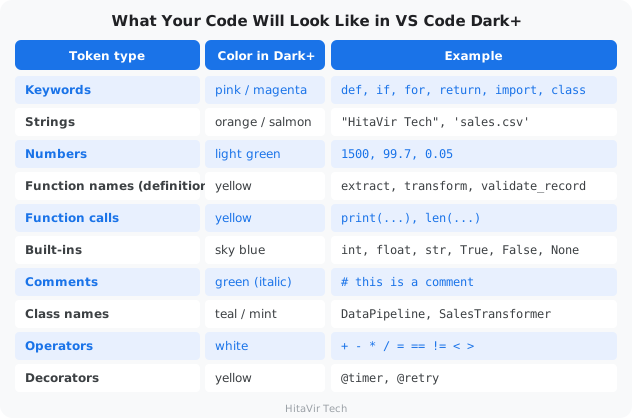
If your code shows up white-on-black with no colors, the Python extension is probably not active — make sure the file is saved with a .py extension and the bottom-right of VS Code shows "Python" as the language mode.
Step 6 — Create Your Project Folder
mkdir -p ~/python-de-learning
cd ~/python-de-learning
What did that do?
mkdir makes a new folder. ~ is your home folder (e.g., C:/Users/YourName). cd moves into the folder. From now on, every file you create lives here.
Step 7 — Create a Virtual Environment
python -m venv venv
What is a virtual environment, and why?
A virtual environment (venv) is a private sandbox of Python libraries for this project only. Different projects need different versions of libraries — without a venv, they would conflict. The venv folder holds its own Python and its own libraries, isolated from everything else.
Activate it:
Git Bash:
source venv/Scripts/activate
Command Prompt:
venv\Scripts\activate
You should see (venv) at the beginning of your prompt — that means it is active:
(venv) user@COMPUTER ~/python-de-learning
$
Step 8 — Install Essential Packages
pip install pandas numpy requests
What did we just install?
- pandas — the spreadsheet-in-Python library every data engineer uses
- numpy — fast number-crunching (pandas is built on top of it)
- requests — for calling APIs to pull data over the internet
Save your dependency list so anyone can recreate your environment:
pip freeze > requirements.txt
cat requirements.txt
What is requirements.txt?
requirements.txt is a plain-text file listing every library your project uses, with versions. When you share your project, others run pip install -r requirements.txt to get the exact same setup.
Step 9 — Verify Everything Works
Create a test file named test_setup.py:
import sys
import pandas as pd
import numpy as np

print(f"Python version: {sys.version}")
print(f"pandas version: {pd.__version__}")
print(f"numpy version: {np.__version__}")
print("\nHitaVir Tech - Setup Complete!")
print("You are ready to learn Python for Data Engineering!")
Run it:
python test_setup.py
Expected output:
Python version: 3.12.3 (tags/v3.12.3:...)
pandas version: 2.2.1
numpy version: 1.26.4

HitaVir Tech - Setup Complete!
You are ready to learn Python for Data Engineering!
Your Project Structure So Far
python-de-learning/
├── venv/              ← Virtual environment (do not edit)
├── requirements.txt   ← Package list
└── test_setup.py      ← Setup verification
HitaVir Tech says: "Always use virtual environments. In the real world, different projects need different package versions. Virtual environments prevent them from conflicting."
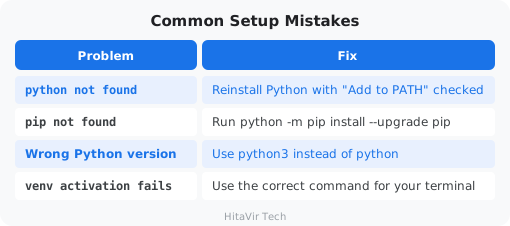
Common Setup Mistakes
Setup Checkpoint — You Should Now Be Able To...
+--------------------------------------------------------------+
|  [ ]  Open a terminal and run `python --version` successfully |
|  [ ]  Activate a virtual environment and see (venv) prompt    |
|  [ ]  Run `pip install pandas` without errors                 |
|  [ ]  Open VS Code and run a .py file with one click          |
|  [ ]  Recreate this setup on any new Windows machine          |
+--------------------------------------------------------------+
If any box is unchecked, revisit the step above before moving on.
What You Have Learnt on This Page
By the end of this page you should be able to confidently:
- Install Python with PATH enabled and verify with
python --version - Use pip to install third-party libraries
- Install VS Code, the Python extension, and switch to Dark+ (default dark) theme
- Create a virtual environment (
venv) and activate it - Run
pip install pandasinside the venv without errors - Recreate this entire setup on any new Windows machine
PEP 8 — Configure Your Editor to Enforce Style Automatically
A great environment is one where PEP 8 is enforced for you, every save. Set this up now — never type indentation by hand again.
- In VS Code, set Editor: Tab Size = 4 and Insert Spaces = true
- Search settings for Render Whitespace → set to
all(so tabs vs. spaces are visible) - Install the Black Formatter and Flake8 extensions
- Enable Format On Save with Black as the default formatter
- Group your imports: stdlib → third-party → local, one blank line between groups
Inspiration for the road ahead:
"Give me six hours to chop down a tree, and I will spend the first four sharpening the axe." — Abraham Lincoln
What is PEP 8?
PEP 8 is the official Style Guide for Python Code — a set of rules that tells you HOW to format your code so every Python developer in the world can read it. PEP stands for "Python Enhancement Proposal." PEP 8 was written in 2001 by Guido van Rossum (Python's creator) and is the universal standard.
Read the full document any time at: https://peps.python.org/pep-0008/
Why does this matter for Data Engineers?
Code is read 10 times more than it is written. Every team you join — banks, startups, FAANG, consultancies — expects PEP 8-compliant code. Tools like black, flake8, ruff, and pylint check it automatically in CI/CD. If your pull request fails the style check, it does not merge.
The Big Picture — The 7 Pillars of PEP 8
+-----------------------------------------------------------------+
|                  THE 7 PILLARS OF PEP 8                         |
+-----------------------------------------------------------------+
|   1. Indentation        4 spaces, never tabs                    |
|   2. Line Length        79 chars (88 with Black formatter)      |
|   3. Imports            Top of file, grouped, alphabetized      |
|   4. Naming             snake_case, PascalCase, UPPER_SNAKE     |
|   5. Whitespace         Around operators, after commas          |
|   6. Comments           Block, inline, docstrings               |
|   7. Recommendations    `is None`, `isinstance`, `enumerate`    |
+-----------------------------------------------------------------+
Let us walk through each pillar with Data Engineering examples.
Pillar 1 — Indentation
The rule: 4 spaces per indentation level. Never tabs. Never mix.
Python uses indentation to know what code is "inside" a function, loop, or if. Consistent indentation is not a suggestion — it is a syntax requirement.
CORRECT — 4 spaces per level
def transform(records):
    for record in records:
        if record["valid"]:
            record["total"] = record["price"] * record["quantity"]
    return records
WRONG — 2 spaces (works but breaks the standard)
def transform(records):
  for record in records:
    if record["valid"]:
      record["total"] = record["price"] * record["quantity"]
  return records
FATAL — mixing tabs and spaces (Python crashes with
TabError
)
def transform(records):
    for record in records:    # ← spaces
        if record["valid"]:   # ← tab here = invisible bug
            ...
VS Code fix: Open Settings, search for render whitespace, set it to all. Tabs and spaces become visible so you can spot the mix instantly.
Pillar 2 — Line Length
The rule:
- PEP 8 default: 79 characters (a 1980s legacy from VT100 terminals)
- Black formatter: 88 characters (the modern compromise)
- Many teams: 120 characters (matches a wide monitor)
Pick one limit per project and stick to it. Long lines are painful to review side-by-side in a pull request diff.
WRONG — 130+ characters, hard to scan
result = pd.merge(sales_df, customer_df, left_on="customer_id", right_on="id", how="left", validate="many_to_one")
CORRECT — wrapped at 88 chars, every argument on its own line
result = pd.merge(
    sales_df,
    customer_df,
    left_on="customer_id",
    right_on="id",
    how="left",
    validate="many_to_one",
)
Pillar 3 — Imports
The rule: Imports go at the top of the file, on separate lines, grouped in this order, with one blank line between groups:
- Standard library —
os,csv,json,logging - Third-party libraries —
pandas,numpy,requests - Local modules —
from src.transform import clean
CORRECT — three groups, separated by blank lines
import csv
import json
import logging
from datetime import datetime

import numpy as np
import pandas as pd

from src.extract import extract_csv
from src.transform import clean_records
WRONG — common beginner mistakes
from pandas import *           # wildcard pollutes the namespace
import os, sys, json           # multiple imports on one line
import pandas, csv, datetime   # mixes stdlib and third-party
Pillar 4 — Naming Conventions
The naming cheat sheet that fits in your head:
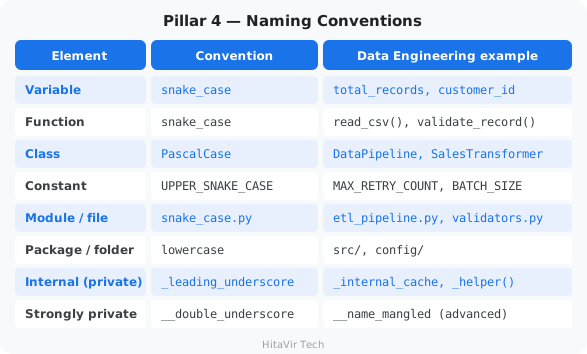
CORRECT
MAX_BATCH_SIZE = 1000   # constant — UPPER_SNAKE_CASE

def calculate_total(price, quantity):   # function — snake_case
    return price * quantity

class SalesPipeline:                    # class — PascalCase
    def __init__(self, source_path):
        self.source_path = source_path
        self._records_cache = []        # internal — leading underscore
WRONG
maxBatchSize = 1000           # camelCase is JavaScript, not Python
def CalculateTotal(p, q):     # PascalCase belongs to classes
    return p * q
class sales_pipeline:         # snake_case belongs to functions/vars
    pass
PITFALL: Single-letter variables (x, i, tmp, c) are acceptable inside short loops or list comprehensions only. In a real pipeline, customer_id always beats c. Future-you will thank present-you.
Pillar 5 — Whitespace
Where to use spaces (and where NOT to):
# CORRECT — spaces around binary operators
total = price * quantity + tax

# CORRECT — space after every comma
process(records, batch_size, retries)

# CORRECT — spaces around assignment in normal code
threshold = 0.05

# CORRECT — NO spaces around = in keyword arguments / defaults
def connect(host, port=5432):
    pass

connect(host="localhost", port=5432)

# CORRECT — NO spaces inside brackets
records[0]
{"key": "value"}
# WRONG — common whitespace mistakes
total=price*quantity+tax            # missing spaces around operators
process(records,batch_size,retries) # missing spaces after commas
threshold=0.05                       # missing spaces around =
def connect(host, port = 5432):     # extra spaces around = in default
    pass
records[ 0 ]                         # extra spaces inside brackets
{ "key" : "value" }                  # extra spaces inside braces
Pillar 6 — Comments and Docstrings
Three kinds of comments — know when to use which:
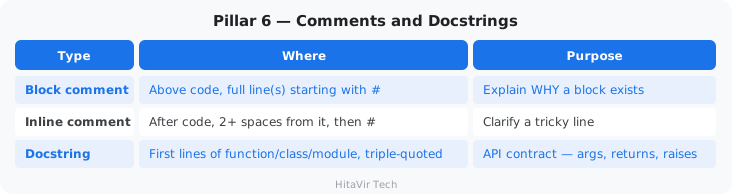
# CORRECT — block comment explains WHY
# Group every order by region and sum the revenue.
# Used by the daily executive dashboard.
revenue_by_region = df.groupby("region")["total"].sum()


def validate_record(record, rules):
    """
    Validate a single record against business rules.

    Args:
        record (dict): The record to check.
        rules (dict): Validation rules from config.

    Returns:
        tuple: (is_valid: bool, errors: list[str])
    """
    ...
# CORRECT — inline comment explains WHY, not WHAT
total = price * quantity  # tax added later by enrichment step

# WRONG — useless restatement of the code
total = price * quantity  # multiply price by quantity
Pillar 7 — Programming Recommendations
The "Pythonic" rules every Data Engineer should know:
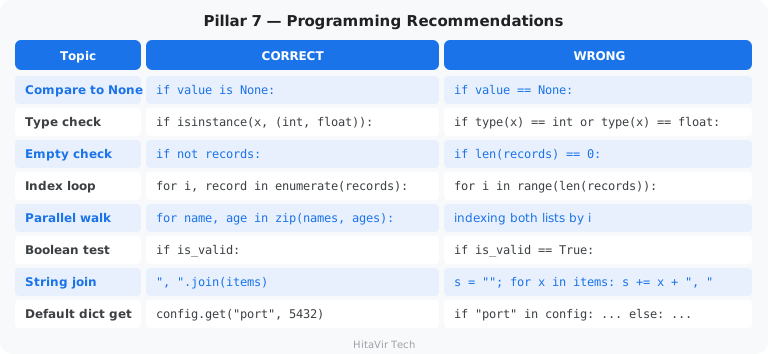
The PEP 8 Toolchain — Tools That Check (and Fix) Your Code
You do not memorize PEP 8 by heart — you install tools that check (and even fix) it for you.
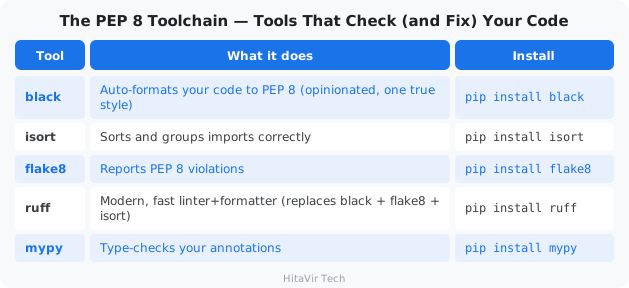
The 60-second setup for any DE project:
# Install everything
pip install black isort flake8 ruff

# Auto-format your code (run before every commit)
black .
isort .

# Or use the modern, single-tool approach
ruff format .
ruff check . --fix
Add these to a requirements-dev.txt so every teammate uses the same versions.
Putting It All Together — A Real Refactor
The same logic, before and after PEP 8 is applied. Read both — feel the difference.
BEFORE — works, but painful
import pandas as pd,numpy as np,csv,json,logging
def TransformData( records,Threshold=100 ):
  Cleaned=[]
  for i in range(len(records)):
    r=records[i]
    if r["price"]==None:continue
    if r["price"]>Threshold:
      r["total"]=r["price"]*r["qty"];r["category"]="premium"
      Cleaned.append( r )
  return Cleaned
AFTER — PEP 8 compliant
import csv
import json
import logging

import numpy as np
import pandas as pd


def transform_data(records, threshold=100):
    """Filter premium records and compute totals."""
    cleaned = []
    for record in records:
        if record["price"] is None:
            continue
        if record["price"] > threshold:
            record["total"] = record["price"] * record["qty"]
            record["category"] = "premium"
            cleaned.append(record)
    return cleaned
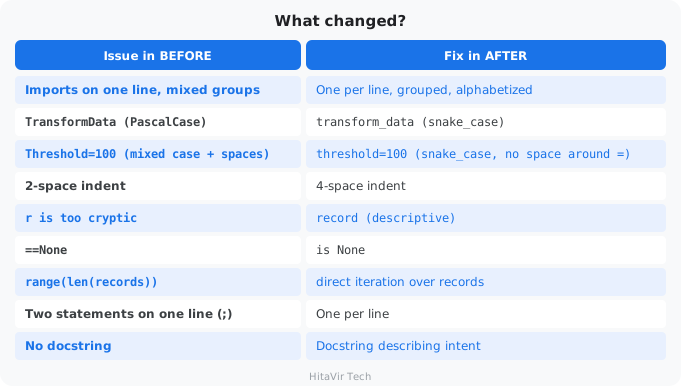
What changed?
Try It — Format the Bad Code Yourself
Save this deliberately messy code as bad_style.py:
import pandas as pd,numpy as np,csv,json,logging
def TransformData( records,Threshold=100 ):
  Cleaned=[]
  for i in range(len(records)):
    r=records[i]
    if r["price"]==None:continue
    if r["price"]>Threshold:
      r["total"]=r["price"]*r["qty"];r["category"]="premium"
      Cleaned.append( r )
  return Cleaned
Now let the tools fix it for you. Install Black and auto-format the file:
pip install black
black bad_style.py
Reopen the file — Black has fixed the indentation, spacing, and line breaks automatically. Naming and the == None check are style issues Black does not touch, so run Flake8 to flag those:
pip install flake8
flake8 bad_style.py
You will see flake8 print the remaining issues — naming and == None. Fix those by hand and run flake8 again until it prints nothing. That silence is the goal.
PEP 8 Cheat Card — Tape This Above Your Monitor
+----------------------------------------------------------+
|  PEP 8 QUICK REFERENCE  -  for Data Engineers            |
+----------------------------------------------------------+
|  Indent       | 4 spaces, no tabs                        |
|  Line length  | 79  (or 88 if using Black)               |
|  Blank lines  | 2 between top-level defs, 1 between meth |
|  Imports      | stdlib  ->  third-party  ->  local       |
|  Strings      | "double quotes" preferred for text       |
|  Variables    | snake_case                               |
|  Functions    | snake_case()                             |
|  Classes      | PascalCase                               |
|  Constants    | UPPER_SNAKE                              |
|  Privates     | _leading_underscore                      |
|  None check   | `if x is None:`  not  `== None`          |
|  Type check   | `isinstance(x, int)`  not  `type(x)==int`|
|  Empty check  | `if not records:`  not  `len() == 0`     |
|  Format       | run `black .` before every commit        |
|  Lint         | run `flake8 .` or `ruff check .`         |
+----------------------------------------------------------+
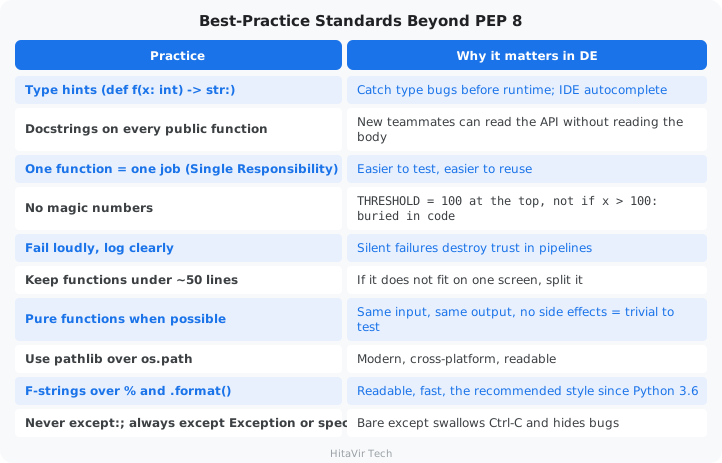
Best-Practice Standards Beyond PEP 8
PEP 8 is style. These are the engineering practices every Data Engineer follows on top of it.
PEP 8 Checkpoint — You Should Now Be Able To...
+----------------------------------------------------------------+
|  [ ]  Explain what PEP 8 is and why it exists                  |
|  [ ]  Apply 4-space indentation correctly                      |
|  [ ]  Group imports in stdlib / third-party / local order      |
|  [ ]  Pick the right naming style for vars, funcs, classes     |
|  [ ]  Place spaces around operators but not in default params  |
|  [ ]  Write a function with a proper docstring                 |
|  [ ]  Run `black` and `flake8` to auto-check your code         |
+----------------------------------------------------------------+
HitaVir Tech says: "PEP 8 is to Python what tabs and bullet points are to a resume — non-negotiable polish. Once your editor formats your code with black on every save, you stop thinking about style and focus on logic. That is the goal."
Assignment 0 — Style-Refactor Drill
Goal: Take the bad-style code from this section and clean it up by hand. Then verify with the tools.
Tasks:
- Create a new file
assignment_00_pep8.pyand paste in this messy code:
import pandas as pd,numpy as np,csv,json,logging
def TransformData( records,Threshold=100 ):
  Cleaned=[]
  for i in range(len(records)):
    r=records[i]
    if r["price"]==None:continue
    if r["price"]>Threshold:
      r["total"]=r["price"]*r["qty"];r["category"]="premium"
      Cleaned.append( r )
  return Cleaned
- Without running tools yet, rewrite it by hand to fix:
- Indentation (4 spaces)
- Imports (one per line, grouped: stdlib, third-party, local)
- Function name (
snake_case) - Parameter name (
threshold, lowercase, no spaces around=) - Variable names (
recordinstead ofr,cleanedinstead ofCleaned) - Loop pattern (use
for record in records:, notrange(len(...))) == None->is None- Two statements per line -> one per line
- Add a docstring
- Now install and run the tools:
pip install black flake8
black assignment_00_pep8.py
flake8 assignment_00_pep8.py
- Fix any remaining
flake8warnings until it prints nothing.
Success criteria:
- [ ] All 9 issues from the "what changed" table fixed by hand
- [ ]
blackmakes no further changes (file is already formatted) - [ ]
flake8reports zero warnings - [ ] Function still produces the same output for the same input
Stretch goal: Add type hints (list[dict], int, etc.) and run mypy to confirm they are correct.
What You Have Learnt on This Page
By the end of this page you should be able to confidently:
- Explain what PEP 8 is, who wrote it (Guido van Rossum, 2001), and why it is universal
- Apply all 7 Pillars of PEP 8 (indentation, line length, imports, naming, whitespace, comments, recommendations)
- Pick the right naming style:
snake_case,PascalCase,UPPER_SNAKE,_private - Run
blackto auto-format andflake8to lint until flake8 prints nothing - Recognise the engineering practices beyond PEP 8 — type hints, docstrings, single responsibility, no magic numbers
Your Lifetime PEP 8 Commitment
From this page on, every single Python file you write in this codelab — and beyond — will be:
- Auto-formatted with
blackbefore commit - Lint-clean under
flake8(zero warnings) - Reviewed against the PEP 8 Cheat Card above
Inspiration for the road ahead:
"Any fool can write code that a computer can understand. Good programmers write code that humans can understand." — Martin Fowler
What is a variable?
A variable is a name that points to a value. Think of it as a labeled box: you write a label on the box (the variable name), put something inside (the value), and later refer to the box by its label.
Example: total_records = 15000 means "make a labeled box named total_records and put the number 15000 inside it."
What is a data type?
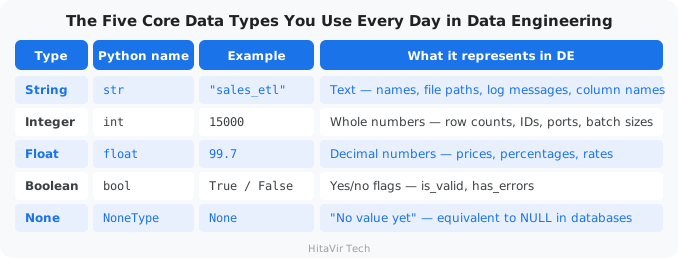
The data type tells Python what kind of value is in the box — a number, some text, a true/false flag, etc. Python figures this out automatically when you assign a value.
Visual Mental Model — Variables in Memory
        Your code                   What Python does in memory
        ---------                   --------------------------

   pipeline_name = "Sales ETL"
                                    +-----------------+      +-----------+
   total_records = 15000            | pipeline_name   | ---> | "Sales ETL"|
                                    +-----------------+      +-----------+
   success_rate  = 99.7
                                    +-----------------+      +-----------+
   is_production = True             | total_records   | ---> |   15000   |
                                    +-----------------+      +-----------+
                                    +-----------------+      +-----------+
                                    | success_rate    | ---> |   99.7    |
                                    +-----------------+      +-----------+
                                    +-----------------+      +-----------+
                                    | is_production   | ---> |   True    |
                                    +-----------------+      +-----------+

           NAME (label)                         VALUE (the data)
The variable name is a sticker on a box. Python remembers which box each sticker is attached to.
Let us write real Python code. Create a new file for each section.
The Five Core Data Types You Use Every Day in Data Engineering
Variables — Storing Data
How to follow the code in this codelab: every example shows a filename in bold followed by the code. Create a new file with that exact name in your project folder, paste in the code, then run the Run it: command shown below it. Working through each file by hand — rather than copy-pasting blindly — is what builds real fluency.
basics_variables.py
# ============================================
# HitaVir Tech - Python Variables & Data Types
# ============================================
# A variable is a labelled box that stores a value.
# Below we describe one person using all five core types.

# --- String (str): text, always written inside quotes ---
name = "Asha"
city = "Bangalore"

print(f"Name: {name}")
print(f"City: {city}")

# --- Integer (int): whole numbers, no decimal point ---
age = 25
birth_year = 2001

print(f"\nAge: {age}")
print(f"Born in: {birth_year}")

# --- Float (float): numbers that have a decimal point ---
height_m = 1.65
wallet = 250.75

print(f"\nHeight: {height_m} m")
print(f"Money in wallet: {wallet}")

# --- Boolean (bool): a yes/no answer, either True or False ---
is_student = True
has_license = False

print(f"\nIs a student? {is_student}")
print(f"Has a driving licence? {has_license}")

# --- None: 'no value yet', like a blank field on a form ---
middle_name = None
print(f"\nMiddle name: {middle_name}")
Run it:
python basics_variables.py
Expected output:
Name: Asha
City: Bangalore

Age: 25
Born in: 2001

Height: 1.65 m
Money in wallet: 250.75

Is a student? True
Has a driving licence? False

Middle name: None
What is an f-string?
An f-string (formatted string) is text starting with f"..." that lets you drop variables straight into the text using { }. Example: f"Age: {age}" becomes "Age: 25". This is the modern, recommended way to build strings in Python.
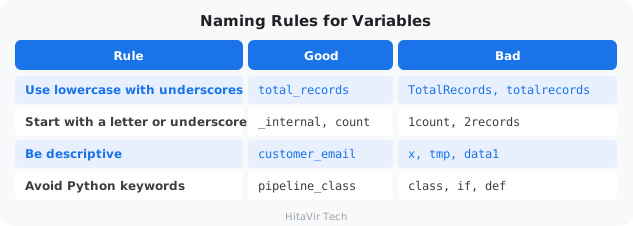
Naming Rules for Variables
Type Checking and Conversion
What is type conversion?
Often a value comes in one type but you need it in another. The most common case: anything a user types, or any value read from a file, arrives as text. Before you can do maths with "25", you must convert it to the number 25. That is type conversion.
basics_types.py
# ============================================
# HitaVir Tech - Checking and Converting Types
# ============================================

# --- type() tells you what kind of value you have ---
age = 25
name = "Asha"
is_student = True

print(f"age is a {type(age)}")               # <class 'int'>
print(f"name is a {type(name)}")             # <class 'str'>
print(f"is_student is a {type(is_student)}")  # <class 'bool'>

# --- Text to integer: needed when a number arrives as text ---
typed_age = "25"            # this is text, not a number
real_age = int(typed_age)   # convert text -> integer
print(f"\nNext year you will be {real_age + 1}")

# --- Number to text: so you can join it into a sentence ---
apples = 7
message = "I have " + str(apples) + " apples"
print(message)

# --- Text to float: for prices or measurements ---
price_text = "49.99"
price = float(price_text)
print(f"Price with tax: {price * 1.1:.2f}")
Run it:
python basics_types.py
Operators
What is an operator?
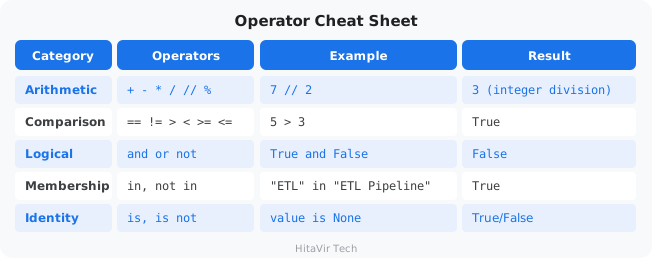
An operator is a symbol that performs an action on values: + adds, == compares, and combines two truths. Operators are how you do math, compare data, and check conditions in your pipeline.
basics_operators.py
# ============================================
# HitaVir Tech - Operators
# ============================================

# --- Arithmetic operators: everyday maths ---
slices = 8 + 4         # add: two pizzas             -> 12
left = 10 - 3          # subtract: ate 3 sweets      -> 7
ticket_cost = 3 * 250  # multiply: 3 movie tickets   -> 750
each_pays = 1000 / 4   # divide (gives a decimal)    -> 250.0
full_boxes = 26 // 6   # floor division: whole boxes -> 4
eggs_left = 26 % 6     # modulo: the remainder       -> 2
area = 5 ** 2          # power: 5 squared            -> 25

print(f"Total slices: {slices}")
print(f"Sweets left: {left}")
print(f"Ticket cost: {ticket_cost}")
print(f"Each person pays: {each_pays}")
print(f"Full boxes of 6: {full_boxes}")
print(f"Eggs left over: {eggs_left}")
print(f"5 squared: {area}")

# --- Comparison operators: ask a question, get True or False ---
age = 20
print(f"\nOld enough to vote (>= 18)? {age >= 18}")  # True
print(f"Is exactly 20? {age == 20}")                 # True
print(f"Is not a teenager (!= 13)? {age != 13}")     # True

# --- Logical operators: combine yes/no conditions ---
is_weekend = True
is_sunny = False

print(f"\nGo to the beach? {is_weekend and is_sunny}")  # False
print(f"Do something today? {is_weekend or is_sunny}")  # True
print(f"Stay indoors? {not is_sunny}")                  # True
Run it:
python basics_operators.py
Operator Cheat Sheet
User Input
basics_input.py
# ============================================
# HitaVir Tech - Getting Input From the User
# ============================================

# input() shows a question and waits for the user to type something.
# Whatever they type always comes back as text (a string).
name = input("What is your name? ")
age_text = input("How old are you? ")

# Convert the age text to a number so we can do maths with it.
age = int(age_text)

print(f"\nHello, {name}!")
print(f"Next year you will be {age + 1} years old.")
Run it:
python basics_input.py
HitaVir Tech says: "In data engineering, you rarely use input(). Instead, you read from files, databases, and APIs. But understanding input/output flow is fundamental to programming."
Assignment 1 — Pipeline Stats Calculator
Goal: Practice every data type, type conversion, operators, and f-strings by building a small pipeline reporter.
The scenario: HitaVir Tech's overnight sales pipeline finished. Your job is to write a script that prints a clean stats summary the on-call engineer can read in 5 seconds.
Tasks:
- Open VS Code and create a new file:
assignment_01_basics.py. - Define these variables (use the right data type for each):
pipeline_name="HitaVir Sales ETL"total_records=50000failure_rate=0.023is_production=Truelast_error=None
- Compute
failed_records=total_records * failure_rate(cast toint). - Compute
success_rate=(1 - failure_rate) * 100. - Print this exact format using f-strings:
============================================
  HitaVir Tech - Pipeline Stats
============================================
Pipeline       : HitaVir Sales ETL
Mode           : PRODUCTION
Records read   : 50,000
Failed records : 1,150
Success rate   : 97.7%
Last error     : None
============================================
Success criteria:
- [ ] All 5 data types used (str, int, float, bool, None)
- [ ] Numbers use thousands separator (
{x:,}) - [ ] Success rate has 1 decimal place (
{x:.1f}) - [ ] "PRODUCTION" or "DEVELOPMENT" picked from
is_productionusing a conditional - [ ] Output matches the format above exactly
Stretch goal: Read each value with input() and convert the strings to the right types before printing.
What You Have Learnt on This Page
By the end of this page you should be able to confidently:
- Define variables and assign values of the 5 core data types —
str,int,float,bool,None - Use
type()to inspect a value and convert types withint(),float(),str() - Apply arithmetic, comparison, logical, membership, and identity operators
- Build readable strings with f-strings (
f"Total: {x:,}") and format numbers ({x:.2f},{x:,}) - Read user input with
input()and convert it to the right type
PEP 8 — Style Rules to Apply Strictly to Variables and Types
Professional Python coders never name a variable like TotalRecords or data1. Apply these rules every single time you declare a value:
- Variable names →
snake_case(e.g.,total_records,pipeline_name) — nevercamelCaseorPascalCase - Constants →
UPPER_SNAKE_CASE(e.g.,MAX_RETRIES = 3) - Be descriptive —
customer_email, neverxortmp - Spaces around
=for normal assignment:total = 1500(nottotal=1500) - No spaces around
=in function default args:def f(x=10):(notdef f(x = 10):) - Prefer "double quotes" for strings (Black's standard)
- Prefer f-strings over
+concatenation or%formatting - Use
is None/is not None— never== None
Inspiration for the road ahead:
"Simple is better than complex. Complex is better than complicated." — Tim Peters, The Zen of Python
What is "control flow"?
Control flow is how Python decides which lines of code to run, and how many times to run them. Without control flow, Python just runs everything top-to-bottom, once. With it, your script can make decisions (if-else) and repeat work (for, while).
Real-life analogy: when you cook, your recipe says "if the water is boiling, add the pasta. Repeat stirring every 30 seconds for 8 minutes." Those ifs and repeats are control flow.
Data pipelines constantly make decisions: Is the data valid? Should we retry? Which path to take? Control flow is how you express that logic.
if-else — Conditional Logic
What is the if-else statement?
if runs a block of code only when a condition is true. elif ("else if") checks another condition. else is the fallback when nothing else matched.
Real-life analogy: "If it is raining, take an umbrella. Else if it is hot, wear sunglasses. Else, just go."
control_if.py
# ============================================
# HitaVir Tech - Control Flow: if / elif / else
# ============================================

# --- Example 1: Did the student pass? (simple if / else) ---
score = 72

if score >= 40:
    print(f"Score {score}: PASS")
else:
    print(f"Score {score}: FAIL")

# --- Example 2: Turn a score into a grade (if / elif / else) ---
# Python checks each condition top to bottom and stops at the FIRST
# one that is True.
print("\n--- Grade ---")
marks = 85

if marks >= 90:
    grade = "A"
elif marks >= 75:
    grade = "B"
elif marks >= 50:
    grade = "C"
else:
    grade = "Fail"

print(f"Marks {marks} -> Grade {grade}")

# --- Example 3: Decide what to do based on the weather ---
print("\n--- What to do today ---")
weather = "rainy"

if weather == "rainy":
    print("Take an umbrella")
elif weather == "sunny":
    print("Wear sunglasses")
else:
    print("Looks like a normal day, just head out")
Run it:
python control_if.py
Pay attention to indentation! Python uses 4 spaces of indentation to know what code is "inside" the if. Mixing tabs and spaces, or wrong indentation, is the #1 beginner error.
Loops — Processing Data
What is a loop?
A loop runs the same block of code multiple times — once per item. Without loops, processing 10 million CSV rows would mean writing 10 million lines of code. With a loop, you write the row-handling code once.
Two kinds of loops:
forloop — repeats once for each item in a collection ("for each row in the file...")whileloop — repeats as long as a condition is true ("while not connected, retry...")
control_loops.py
# ============================================
# HitaVir Tech - Control Flow: Loops
# ============================================

# --- for loop: do something once for EACH item in a list ---
print("--- Greeting friends ---")
friends = ["Asha", "Ravi", "Meena", "John"]

for friend in friends:
    print(f"Hello, {friend}!")

# --- for loop with range(): repeat a fixed number of times ---
# range(1, 6) gives the numbers 1, 2, 3, 4, 5 (6 is not included).
print("\n--- The 7 times table ---")
for number in range(1, 6):
    print(f"7 x {number} = {7 * number}")

# --- Adding things up inside a loop ---
print("\n--- Total shopping bill ---")
prices = [120, 75, 200, 50]
total = 0
for price in prices:
    total += price          # add each price to the running total
print(f"Total to pay: {total}")

# --- while loop: keep repeating WHILE a condition is true ---
# Count down from 3, like a rocket launch.
print("\n--- Countdown ---")
count = 3
while count > 0:
    print(f"{count}...")
    count -= 1              # subtract 1 each time, or it loops forever!
print("Lift off!")

# --- break and continue ---
# break    = stop the loop right now
# continue = skip the rest of THIS turn and go to the next item
print("\n--- Checking the shopping list ---")
shopping = ["milk", "eggs", "candy", "bread", "END", "rice"]

for item in shopping:
    if item == "END":
        print("Reached the end marker. Stopping.")
        break               # leave the loop completely
    if item == "candy":
        print("Skipping candy (too much sugar!)")
        continue            # jump straight to the next item
    print(f"Buying: {item}")
Run it:
python control_loops.py
HitaVir Tech says: "In data engineering, loops process records, retry failed connections, and iterate through batches. The for loop is your workhorse. The while loop is your retry mechanism. Master both."
Assignment 2 — Data Quality Gate
Goal: Build a "data quality gate" that decides which records can flow into the warehouse and which must be quarantined.
The scenario: A daily extract from the upstream system contains some bad records. Before loading, you must inspect every record and route it.
Tasks:
- Create
assignment_02_control.py. - Use this input list (paste it into your file):
records = [
    {"id": 1, "value": 100,  "region": "North"},
    {"id": 2, "value": -50,  "region": "South"},
    {"id": 3, "value": 200,  "region": "INVALID"},
    {"id": 4, "value": None, "region": "East"},
    {"id": 5, "value": 75,   "region": "West"},
    {"id": 6, "value": 320,  "region": "North"},
    {"id": 7, "value": 0,    "region": "South"},
]
VALID_REGIONS = ["North", "South", "East", "West"]
- Loop through each record and apply these rules in this order:
- If
valueisNone-> log"SKIP id={id}: null value"andcontinue - If
valueis less than or equal to0-> log"SKIP id={id}: non-positive value"andcontinue - If
regionis not inVALID_REGIONS-> log"SKIP id={id}: invalid region '{region}'"andcontinue - Otherwise print
"PASS id={id}: ${value} ({region})"and add to avalidlist
- If
- After the loop, print a one-line summary:
"Valid: X | Skipped: Y".
Expected output (last lines):
PASS id=1: $100 (North)
SKIP id=2: non-positive value
SKIP id=3: invalid region 'INVALID'
SKIP id=4: null value
PASS id=5: $75 (West)
PASS id=6: $320 (North)
SKIP id=7: non-positive value
Valid: 3 | Skipped: 4
Success criteria:
- [ ] Uses
if,elif, andelse - [ ] Uses
forover the list - [ ] Uses
continueto skip bad rows - [ ] Uses
into check region membership - [ ] Final summary numbers are correct: 3 valid, 4 skipped
Stretch goal: Wrap the rules in a while loop that retries the whole batch up to 3 times if any record was skipped (simulating a flaky upstream).
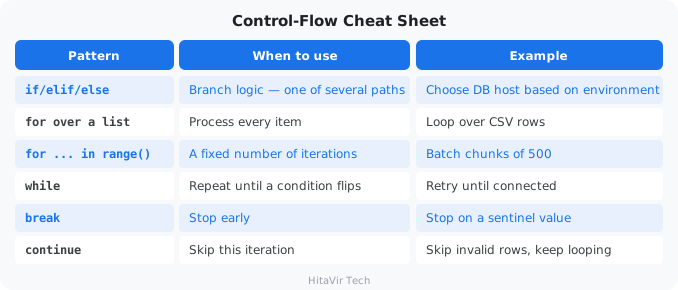
Control-Flow Cheat Sheet
What You Have Learnt on This Page
By the end of this page you should be able to confidently:
- Branch logic with
if/elif/elsebased on data quality, environment, and thresholds - Loop over a list of rows with
for ... in - Use
for ... in range(n)for fixed-count batches - Repeat work until a condition flips with
while(e.g., retry until connected) - Stop early with
breakand skip an iteration withcontinue - Combine conditions with
and,or,notfor pipeline gating
PEP 8 — Style Rules to Apply Strictly to Control Flow
Bad indentation in a for or if block does not just look ugly — it can change the meaning of your program. Apply these rules every single time you write a control-flow block:
- Indent block contents with exactly 4 spaces (never tabs, never 2 spaces)
- One blank line before and after each logical block to aid readability
- Use
is Nonefor null checks, never== None - Use
if not records:to check for empty collections, neverif len(records) == 0: - Use
if x in {a, b, c}:for multi-value membership instead of chainedor - Use
enumerate(items)when you need both index and value — neverrange(len(items)) - Avoid deeply nested blocks (more than 3 levels) — extract into a helper function instead
Inspiration for the road ahead:
"Flat is better than nested. Sparse is better than dense." — Tim Peters, The Zen of Python
What is a function?
A function is a named block of code that performs one task. You define it once, then "call" it (run it) as many times as you want, with different inputs.
Real-life analogy: a microwave is a function. Inputs (arguments): food + time. Output (return value): hot food. You don't rebuild a microwave every time you reheat lunch — same idea here.
In data engineering, functions are the building blocks of every pipeline. Every ETL job is just extract(), then transform(), then load() — three functions you call in order.
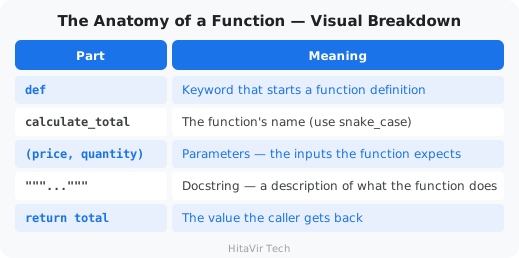
The Anatomy of a Function — Visual Breakdown
        keyword    name           parameters
           |        |                  |
           v        v                  v
        +---+ +---------------+ +------------------+
         def   calculate_total  (price, quantity):
                                                      +--- colon ends the signature
        """Multiply price by quantity."""             |
        |--------------- docstring ---------------|   |
                                                      v
            total = price * quantity   <--- body (indented 4 spaces)
            return total               <--- return value sent back to caller


   When the caller writes:                 Python returns:
        result = calculate_total(99.99, 3)        ----> 299.97
                          |        |
                       price    quantity
                       (arg)     (arg)
def calculate_total(price, quantity):    # def = "define a function"
    """Multiply price by quantity."""    # docstring (optional but recommended)
    total = price * quantity              # body — the actual work
    return total                          # send the result back
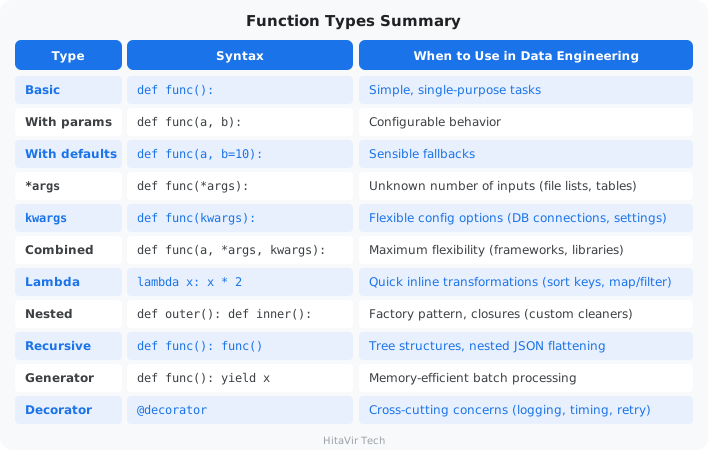
Types of Functions in Python
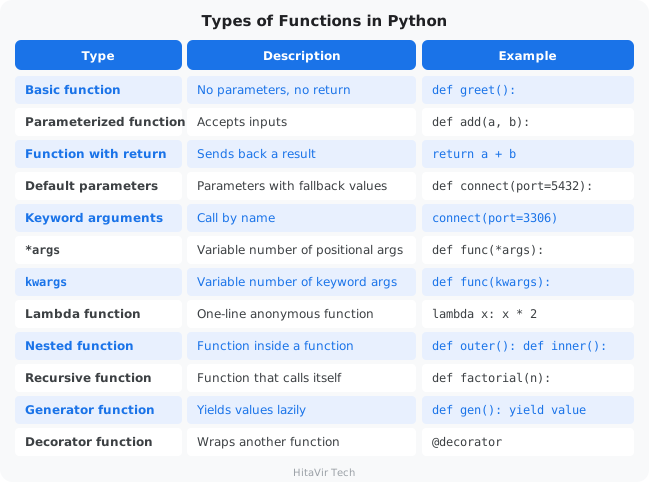
Let us learn each one with real Data Engineering examples.
Part 1 — Basic Functions
func_01_basics.py
# ============================================
# HitaVir Tech - Part 1: Basic Functions
# ============================================

# --- 1A. A function with no inputs and no return value ---
def say_hello():
    """Print a friendly greeting."""
    print("Hello and welcome!")

say_hello()   # "call" the function by writing its name followed by ()

# --- 1B. A function that takes an input (a parameter) ---
def greet(name):
    """Greet a person by name."""
    print(f"Hello, {name}!")

greet("Asha")
greet("Ravi")

# --- 1C. A function that returns a value ---
def add(a, b):
    """Add two numbers and hand the result back."""
    return a + b

answer = add(5, 3)
print(f"5 + 3 = {answer}")

# --- 1D. A function that returns MORE THAN ONE value ---
# Python sends them back as a tuple, which you can unpack.
def min_and_max(numbers):
    """Return both the smallest and the largest number."""
    return min(numbers), max(numbers)

lowest, highest = min_and_max([7, 2, 9, 4])
print(f"Lowest: {lowest}, Highest: {highest}")

# --- 1E. A function that returns a dictionary (a small record) ---
def make_student(name, age):
    """Build a student record as a dictionary."""
    return {"name": name, "age": age, "is_adult": age >= 18}

student = make_student("Meena", 20)
print(f"Student: {student}")
Run it:
python func_01_basics.py
Part 2 — Default Parameters and Keyword Arguments
What is a default parameter?
A parameter with = and a value is optional — if the caller does not pass it, the default kicks in. This is how libraries give you sensible defaults but let you override when needed.
What is a keyword argument?
Calling a function by naming the argument: connect(port=5432). Order does not matter, and the code reads more clearly.
func_02_defaults_kwargs.py
# ============================================
# HitaVir Tech - Part 2: Defaults & Keyword Args
# ============================================

# --- 2A. Default parameters ---
# size and milk have defaults, so only 'drink' is required.
def order_coffee(drink, size="medium", milk=True):
    """Print a coffee order, filling in sensible defaults."""
    milk_text = "with milk" if milk else "black"
    print(f"One {size} {drink}, {milk_text}")

print("--- Default Parameters ---")
order_coffee("latte")                       # uses both defaults
order_coffee("espresso", size="small")      # override one default
order_coffee("americano", "large", False)   # override all of them

# --- 2B. Keyword arguments (call by naming each value) ---
def book_room(name, nights, room="single"):
    """Book a hotel room for a guest."""
    print(f"\n{name} booked a {room} room for {nights} night(s)")

print("--- Keyword Arguments ---")
# Positional: the ORDER of the values matters.
book_room("Asha", 2)
# Keyword: name each value, so the order no longer matters.
book_room(nights=3, name="Ravi", room="double")

# --- 2C. Mutable default argument trap (a famous Python gotcha) ---
# WRONG — the same list is shared and reused on every call!
def bad_add_item(item, cart=[]):
    cart.append(item)
    return cart

# CORRECT — default to None, then create a fresh list inside.
def good_add_item(item, cart=None):
    if cart is None:
        cart = []
    cart.append(item)
    return cart

print("\n--- Mutable Default Trap ---")
print(f"Bad call 1:  {bad_add_item('apple')}")    # ['apple']
print(f"Bad call 2:  {bad_add_item('banana')}")   # ['apple', 'banana'] BUG!
print(f"Good call 1: {good_add_item('apple')}")   # ['apple']
print(f"Good call 2: {good_add_item('banana')}")  # ['banana'] correct!
Run it:
python func_02_defaults_kwargs.py
HitaVir Tech says: "Default parameters are everywhere in data engineering. Database connections, API timeouts, retry counts — they all have sensible defaults that you override when needed."
Part 3 — *args (Variable Positional Arguments)
*What does args mean?
*args lets a function accept any number of positional arguments. Inside the function, args is a tuple of all of them. Useful when you do not know upfront how many inputs there will be — like adding up any number of prices in a shopping cart.
func_03_args.py
# ============================================
# HitaVir Tech - Part 3: *args
# ============================================

# --- 3A. *args lets a function take ANY number of values ---
def add_all(*numbers):
    """Add up however many numbers are passed in."""
    print(f"  Got {len(numbers)} numbers: {numbers}")
    return sum(numbers)

print("--- *args Basics ---")
print(f"Sum of 1,2,3:       {add_all(1, 2, 3)}")
print(f"Sum of 10,20,30,40: {add_all(10, 20, 30, 40)}")
print(f"Sum of one number:  {add_all(100)}")
print(f"Sum of nothing:     {add_all()}")

# --- 3B. A real-world use: total an any-size shopping cart ---
def cart_total(*prices):
    """Return the total bill for any number of item prices."""
    return sum(prices)

print(f"\nSmall cart total: {cart_total(120, 75)}")
print(f"Big cart total:   {cart_total(120, 75, 200, 50, 30)}")

# --- 3C. Combine a normal parameter with *args ---
def greet_all(greeting, *names):
    """Greet everyone using the same greeting."""
    for name in names:
        print(f"{greeting}, {name}!")

print()
greet_all("Hello", "Asha", "Ravi", "Meena")

# --- 3D. Unpacking a list into *args with the * symbol ---
friends = ["Sara", "Tom", "Leo"]

# The * spreads the list out into separate arguments:
greet_all("Hi", *friends)
# Without *, the whole list would arrive as ONE argument.
Run it:
python func_03_args.py
Part 4 — **kwargs (Variable Keyword Arguments)
What does **kwargs mean?
**kwargs lets a function accept any number of keyword arguments. Inside the function, kwargs is a dictionary. Use this when you want maximum flexibility — for example, accepting any number of profile details.
func_04_kwargs.py
# ============================================
# HitaVir Tech - Part 4: **kwargs
# ============================================

# --- 4A. **kwargs collects any number of NAMED values into a dict ---
def print_details(**info):
    """Print whatever details are passed in."""
    print(f"  Got {len(info)} details:")
    for key, value in info.items():
        print(f"    {key} = {value}")

print("--- **kwargs Basics ---")
print_details(name="Asha", age=25, city="Bangalore")
print()
print_details(product="Book", price=299)

# --- 4B. Combine a normal parameter, *args, and **kwargs ---
# The order is always: normal params, then *args, then **kwargs.
def party(host, *guests, **details):
    """Describe a party: who hosts, who comes, and the extra details."""
    print(f"\n  Host: {host}")
    print(f"  Guests: {list(guests)}")
    for key, value in details.items():
        print(f"  {key}: {value}")

party("Asha", "Ravi", "Meena", date="Saturday", theme="retro")

# --- 4C. Unpacking a dictionary into **kwargs with ** ---
profile = {"name": "Ravi", "age": 30, "city": "Pune"}

# ** spreads the dict into name=..., age=..., city=...
print()
print_details(**profile)

# --- 4D. Defaults + overrides: a flexible settings builder ---
def make_settings(**overrides):
    """Start from default settings, then apply any overrides."""
    settings = {"theme": "light", "font_size": 14, "autosave": True}
    settings.update(overrides)
    return settings

print(f"\nDefault settings: {make_settings()}")
print(f"Custom settings:  {make_settings(theme='dark', font_size=18)}")
Run it:
python func_04_kwargs.py
HitaVir Tech says: "*args and **kwargs are the backbone of flexible Python code. Every major framework uses them — Django, Flask, pandas, Spark. When you see **options or *args in library docs, you now know exactly what they mean."
Part 5 — Advanced Function Types
Quick definitions before we dive in:
- Lambda — a one-line, unnamed function. Useful as a tiny "throwaway" function passed to
sorted,map, etc. - Nested function — a function defined inside another function. Used to "build" customized helpers.
- Recursive function — a function that calls itself. Used for tree/JSON-like nested structures.
- Generator — a function that yields values one at a time, saving memory for huge datasets.
- Decorator — a function that wraps another function to add behavior (logging, timing, retries).
func_05_advanced.py
# ============================================
# HitaVir Tech - Part 5: Advanced Function Types
# ============================================

# --- 5A. Lambda: a tiny one-line function with no name ---
print("=" * 40)
print("LAMBDA FUNCTIONS")
print("=" * 40)

def double(x):                   # the normal way
    return x * 2

double_lambda = lambda x: x * 2   # the exact same thing, as a lambda

print(f"Normal: {double(5)}")
print(f"Lambda: {double_lambda(5)}")

# Lambdas are most useful with sorted(), filter() and map().
students = [
    {"name": "Asha", "grade": 85},
    {"name": "Ravi", "grade": 72},
    {"name": "Meena", "grade": 91},
]

# Sort students by grade, highest first.
ranked = sorted(students, key=lambda s: s["grade"], reverse=True)
print("\nRanked by grade:")
for s in ranked:
    print(f"  {s['name']}: {s['grade']}")

# filter() — keep only the items that pass a test.
scores = [30, 60, 45, 90, 50, 75]
passed = list(filter(lambda n: n >= 50, scores))
print(f"\nPass marks (>= 50): {passed}")

# map() — apply the same change to every item.
prices = [100, 200, 300]
with_tax = list(map(lambda p: p * 1.1, prices))
print(f"Prices with 10% tax: {with_tax}")

# --- 5B. Nested function: a function defined inside another ---
print(f"\n{'=' * 40}")
print("NESTED FUNCTIONS")
print("=" * 40)

def make_multiplier(factor):
    """Build and return a function that multiplies by 'factor'."""
    def multiply(number):
        return number * factor      # 'factor' is remembered from outside
    return multiply

double_it = make_multiplier(2)
triple_it = make_multiplier(3)
print(f"double_it(10) = {double_it(10)}")
print(f"triple_it(10) = {triple_it(10)}")

# --- 5C. Recursive function: a function that calls itself ---
print(f"\n{'=' * 40}")
print("RECURSIVE FUNCTIONS")
print("=" * 40)

def factorial(n):
    """factorial(4) means 4 * 3 * 2 * 1."""
    if n <= 1:                      # base case: when to STOP calling itself
        return 1
    return n * factorial(n - 1)     # the function calls itself

print(f"factorial(5) = {factorial(5)}")

# --- 5D. Generator: hands back values one at a time (saves memory) ---
print(f"\n{'=' * 40}")
print("GENERATOR FUNCTIONS")
print("=" * 40)

def squares_up_to(n):
    """Yield 1*1, 2*2, ... n*n, one value at a time."""
    for i in range(1, n + 1):
        yield i * i                 # 'yield' pauses and returns one value

print("Squares:", end=" ")
for value in squares_up_to(5):
    print(value, end=" ")
print()

# --- 5E. Decorator: wraps a function to add extra behaviour ---
print(f"\n{'=' * 40}")
print("DECORATOR FUNCTIONS")
print("=" * 40)

def shout(func):
    """Make whatever text a function returns LOUD."""
    def wrapper(*args, **kwargs):
        result = func(*args, **kwargs)
        return result.upper() + "!"
    return wrapper

@shout
def greet(name):
    return f"hello {name}"

print(greet("asha"))   # -> HELLO ASHA!
Run it:
python func_05_advanced.py
Part 6 — Putting It All Together: Pipeline Functions
func_06_pipeline.py
# ============================================
# HitaVir Tech - Part 6: Putting It All Together
# A mini 3-step process that uses every idea so far
# ============================================

# We will process a list of students in three steps:
#   1) load the data   2) transform it   3) show the result
# This is exactly the shape of a real data pipeline.

# --- A decorator that announces each step ---
def log_step(func):
    """Print a line before and after the function runs."""
    def wrapper(*args, **kwargs):
        print(f"\n[START] {func.__name__}")
        result = func(*args, **kwargs)
        print(f"[DONE]  {func.__name__}")
        return result
    return wrapper

# --- Step 1: load (uses a default parameter) ---
@log_step
def load_students(limit=None):
    """Return a small list of student records."""
    students = [
        {"name": "Asha", "marks": [85, 90, 88]},
        {"name": "Ravi", "marks": [70, 65, 80]},
        {"name": "Meena", "marks": [95, 92, 99]},
        {"name": "John", "marks": [40, 55, 48]},
    ]
    if limit:
        students = students[:limit]
    print(f"  Loaded {len(students)} students")
    return students

# --- Step 2: transform (uses *args to apply many steps) ---
@log_step
def transform(students, *steps):
    """Run each transform step on the students, in order."""
    for step in steps:
        students = step(students)
    return students

def add_average(students):
    """Add each student's average mark."""
    for s in students:
        s["average"] = round(sum(s["marks"]) / len(s["marks"]), 1)
    print("  Added 'average'")
    return students

def add_result(students):
    """Add a Pass/Fail result based on the average."""
    for s in students:
        s["result"] = "Pass" if s["average"] >= 50 else "Fail"
    print("  Added 'result'")
    return students

# --- Step 3: show (uses **kwargs for optional settings) ---
@log_step
def show(students, **options):
    """Print a report. Options control what is shown."""
    only_pass = options.get("only_pass", False)
    for s in students:
        if only_pass and s["result"] != "Pass":
            continue
        print(f"  {s['name']:<6} avg={s['average']:<5} {s['result']}")

# --- Run the three steps together ---
print("=" * 40)
print("  HitaVir Tech - Student Report")
print("=" * 40)

data = load_students()
data = transform(data, add_average, add_result)
show(data, only_pass=False)

print("\nAll done!")
Run it:
python func_06_pipeline.py
Function Types Summary
The argument order rule
When combining all argument types, they must appear in this order:
def func(regular, default=val, *args, keyword_only, **kwargs):
    pass

# Example:
def pipeline(name, mode="batch", *sources, notify=True, **options):
    pass
HitaVir Tech says: "Functions are the atoms of programming — everything is built from them. Every data pipeline is just extract(), transform(), load(). Every API endpoint is a function. Every automation script is a collection of functions. Master functions and you master Python."
Assignment 3 — Reusable Validation Toolkit
Goal: Build a small library of reusable functions that any pipeline at HitaVir Tech could import.
The scenario: Three teams keep re-writing the same validators. Build them once, write proper docstrings, and ship a single toolkit file everyone can import.
Tasks:
- Create
assignment_03_functions.py. - Implement these four functions, each with a docstring and snake_case name:
validate_email(email)-> returnsTrueif the string contains@and.(after the@), elseFalse.clean_name(name)-> returns a stripped, title-cased version. IfNoneor empty, return"Unknown".calculate_total(price, quantity, tax_rate=0.18)-> returnsround(price * quantity * (1 + tax_rate), 2). Default tax 18%.summarize(*amounts, label="Total")-> prints"{label}: ${sum:,.2f}"for any number of amounts.
- Below the functions, add a
if __name__ == "__main__":block that calls each function with at least 3 different inputs and prints the results.
Sample output:
validate_email('alice@hitavir.tech') -> True
validate_email('not-an-email')       -> False
clean_name('  alice johnson  ')      -> Alice Johnson
clean_name(None)                     -> Unknown
calculate_total(99.99, 3)            -> 354.0
calculate_total(50, 2, tax_rate=0.0) -> 100.0
Total: $1,250.50
Refunds: $35.99
Success criteria:
- [ ] All four functions defined with docstrings
- [ ] Default parameter used in
calculate_total - [ ]
*argsused insummarize - [ ] All functions called at least 3 times each
- [ ] Code passes
flake8 assignment_03_functions.pywith zero warnings
Stretch goal: Add a @timer decorator from the codelab and apply it to summarize. Also add type hints (e.g., def calculate_total(price: float, quantity: int, tax_rate: float = 0.18) -> float:).
What You Have Learnt on This Page
By the end of this page you should be able to confidently:
- Define and call functions with positional, default,
*args, and**kwargsparameters - Return single or multiple values (tuples) from a function
- Understand local vs. global scope and avoid mutating globals
- Write
lambdaexpressions for simple one-liners (withsorted,map,filter) - Build and apply decorators (
@timer,@retry) to wrap reusable behaviour - Compose small, single-purpose functions into a working pipeline
PEP 8 — Style Rules to Apply Strictly to Functions
A function is the unit of reusable code in Python. Sloppy function signatures are a tell-tale sign of an amateur. Apply these rules every single time you write def:
- Function names →
snake_case(e.g.,extract_records,validate_row) — neverCamelCase - Two blank lines between top-level function definitions
- One blank line between methods inside a class
- No spaces around
=in keyword/default arguments:def f(x, y=10): - Every public function gets a docstring (triple-quoted) explaining purpose, args, returns
- Add type hints:
def total(price: float, qty: int) -> float: - Each function should do one job — if it does two, split it
- Keep functions under ~50 lines — if it does not fit on one screen, refactor
Inspiration for the road ahead:
"The function of good software is to make the complex appear to be simple." — Grady Booch
What is a "data structure"?
A data structure is a way of organizing values together so you can work with them efficiently. Python ships with four built-in collections — list, tuple, set, dictionary — and one more sequence you use constantly: the string (a sequence of characters). Each is best for a specific job.
Real-life analogy:
- String — a word spelled out letter by letter (ordered characters, locked)
- List — a numbered to-do list (order matters, can edit, duplicates allowed)
- Tuple — your printed boarding pass (order matters, locked, cannot edit)
- Set — a collection of unique stamps (no duplicates, no order)
- Dictionary — a phone contacts list (look up a number by name)
Visual Comparison — The Four Collections at a Glance
   LIST  [ ]                          TUPLE  ( )
   +---+---+---+---+                  +---+---+---+---+
   | A | B | C | A |  <-- duplicates  | A | B | C | A |  <-- locked,
   +---+---+---+---+                  +---+---+---+---+      cannot
     0   1   2   3   <-- positions      0   1   2   3      change
   ordered, mutable                    ordered, immutable


   SET  { }                           DICT  { key: value }
   +---+---+---+                      +-----+-----+-----+
   | A | B | C |  <-- unique only     | id  | name|email|   keys
   +---+---+---+                      +-----+-----+-----+
   no order, no duplicates            | 1   |Alice| a@.. |  values
                                      +-----+-----+-----+
                                      lookup by KEY (not position)
Data engineers use these every single day. Master them and you can model almost any data.
The rest of this page walks through each structure on its own, with a separate, runnable example for every built-in method — no mixing. Type each snippet into its own file and run it. Seeing one method per example is how the muscle memory forms.
Lists — Ordered, Mutable Collections
A list is an ordered, changeable sequence. It is the workhorse of data engineering: a batch of rows, a set of column names, a queue of files to process.
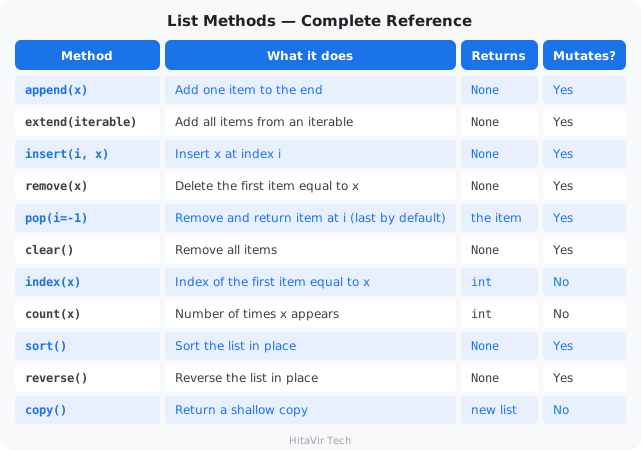
List Methods — Complete Reference
Example 1 — Creating and Accessing a List
list_access.py
# ============================================
# HitaVir Tech - Lists: Creating and Accessing
# ============================================

# A list holds an ordered, changeable collection of items.
groceries = ["milk", "eggs", "bread", "apples"]

# Access by position — indexing starts at 0; negatives count from the end.
print(f"First item:   {groceries[0]}")
print(f"Last item:    {groceries[-1]}")
print(f"Second item:  {groceries[1]}")

# Slicing — [start:stop:step] returns a NEW sub-list.
print(f"First two:    {groceries[:2]}")
print(f"Last two:     {groceries[-2:]}")
print(f"Every other:  {groceries[::2]}")
print(f"Reversed:     {groceries[::-1]}")

# How many items, and does a value exist?
print(f"Total items:  {len(groceries)}")
print(f"Has 'eggs'?   {'eggs' in groceries}")
Run it:
python list_access.py
Example 2 — Adding Items: append(), insert(), extend()
list_add.py
# ============================================
# HitaVir Tech - Lists: Adding Items
# ============================================

todo = ["wake up", "brush teeth"]
print(f"Start:        {todo}")

# append(x) — add ONE item to the end.
todo.append("eat breakfast")
print(f"append:       {todo}")

# insert(i, x) — add ONE item at a specific position.
todo.insert(0, "switch off alarm")
print(f"insert:       {todo}")

# extend(iterable) — add MANY items from another iterable.
todo.extend(["go to work", "have lunch"])
print(f"extend:       {todo}")

# Common trap: append() with a list NESTS it; extend() MERGES it.
demo = ["a"]
demo.append(["b", "c"])   # -> ['a', ['b', 'c']]
print(f"append a list: {demo}")
Run it:
python list_add.py
Example 3 — Removing Items: remove(), pop(), clear()
list_remove.py
# ============================================
# HitaVir Tech - Lists: Removing Items
# ============================================

columns = ["id", "name", "temp", "email", "debug"]
print(f"Start:        {columns}")

# remove(x) — delete the FIRST matching value (ValueError if absent).
columns.remove("temp")
print(f"remove:       {columns}")

# pop(i) — remove AND return the item at index i (default: last).
last = columns.pop()
print(f"pop():        {last!r}  ->  {columns}")

first = columns.pop(0)
print(f"pop(0):       {first!r}  ->  {columns}")

# del — delete by index or slice (returns nothing).
del columns[0]
print(f"del[0]:       {columns}")

# clear() — empty the whole list.
columns.clear()
print(f"clear():      {columns}")
Run it:
python list_remove.py
Example 4 — Searching and Counting: index(), count()
list_search.py
# ============================================
# HitaVir Tech - Lists: Searching and Counting
# ============================================

status_log = ["ok", "ok", "fail", "ok", "fail", "ok"]

# count(x) — how many times a value appears.
print(f"'ok' count:   {status_log.count('ok')}")
print(f"'fail' count: {status_log.count('fail')}")

# index(x) — position of the FIRST match (ValueError if absent).
print(f"First 'fail': index {status_log.index('fail')}")

# index(x, start) — search from a given position onward.
print(f"Next 'fail':  index {status_log.index('fail', 3)}")

# Always check membership before index() to avoid a crash.
if "timeout" in status_log:
    print(f"'timeout':    index {status_log.index('timeout')}")
else:
    print("'timeout':    not found")
Run it:
python list_search.py
Example 5 — Reordering: sort(), reverse(), copy()
list_reorder.py
# ============================================
# HitaVir Tech - Lists: Sorting, Reversing, Copying
# ============================================

scores = [85, 92, 78, 95, 88]

# sort() — sorts IN PLACE (changes the original, returns None).
scores.sort()
print(f"Ascending:    {scores}")

scores.sort(reverse=True)
print(f"Descending:   {scores}")

# sort(key=...) — sort by a custom rule.
words = ["python", "sql", "spark", "go"]
words.sort(key=len)
print(f"By length:    {words}")

# reverse() — reverse the order IN PLACE.
words.reverse()
print(f"Reversed:     {words}")

# copy() — a shallow copy so the original is left untouched.
backup = scores.copy()
backup.append(100)
print(f"Original:     {scores}")
print(f"Copy + 100:   {backup}")
Run it:
python list_reorder.py
Example 6 — Built-in Functions That Work on Lists
These are global functions, not list methods — you pass the list as an argument. The key distinction: list.sort() changes the list and returns None, while sorted(list) leaves the list alone and returns a new sorted list.
list_builtins.py
# ============================================
# HitaVir Tech - Built-in Functions on Lists
# ============================================

scores = [85, 92, 78, 95, 88, 76, 91]

print(f"len()      count:        {len(scores)}")
print(f"sum()      total:        {sum(scores)}")
print(f"min()      lowest:       {min(scores)}")
print(f"max()      highest:      {max(scores)}")
print(f"sorted()   new sorted:   {sorted(scores)}")
print(f"reversed() new reversed: {list(reversed(scores))}")

# any() / all() — boolean checks across the whole list.
flags = [True, True, False]
print(f"any()  at least one True? {any(flags)}")
print(f"all()  every item True?   {all(flags)}")

# enumerate() — index AND value together (ideal for numbered loops).
print("\nenumerate():")
for index, score in enumerate(scores[:3], start=1):
    print(f"  Row {index}: {score}")

# zip() — pair up two lists element by element.
names = ["Alice", "Bob", "Carol"]
ages = [30, 25, 35]
print("\nzip():")
for name, age in zip(names, ages):
    print(f"  {name} is {age}")
Run it:
python list_builtins.py
HitaVir Tech says: "Interviewers love the sort() vs sorted() question. sort() mutates and returns None (so x = my_list.sort() is a classic bug — x is None). sorted() returns a new list and works on any iterable."
Strings — Ordered, Immutable Text
A string is a sequence of characters written in quotes. Like a list, you can index and slice it; like a tuple, it is immutable — so every "change" method hands back a brand-new string and leaves the original untouched. Strings are everywhere in data work: names, dates, CSV lines, and log messages all arrive as text.
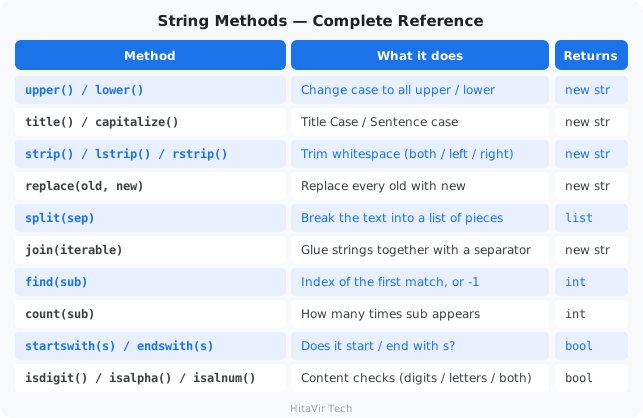
String Methods — Complete Reference
Strings are immutable, so every method below returns a new string (or a list / number) — none of them change the original.
Example 1 — Creating and Accessing a String
string_access.py
# ============================================
# HitaVir Tech - Strings: Creating and Accessing
# ============================================

# A string is text wrapped in quotes — a sequence of characters.
name = "Python"

# Access one character by position (indexing starts at 0).
print(f"First letter: {name[0]}")
print(f"Last letter:  {name[-1]}")

# Slicing — [start:stop:step] returns a NEW piece of the string.
print(f"First three:  {name[:3]}")
print(f"Last two:     {name[-2:]}")
print(f"Reversed:     {name[::-1]}")

# How long is it, and does it contain something?
print(f"Length:       {len(name)}")
print(f"Has 'th'?     {'th' in name}")
Run it:
python string_access.py
Example 2 — Changing Case: upper(), lower(), title(), capitalize()
string_case.py
# ============================================
# HitaVir Tech - Strings: Changing Case
# ============================================

text = "hello WORLD"

print(f"upper():      {text.upper()}")        # HELLO WORLD
print(f"lower():      {text.lower()}")        # hello world
print(f"title():      {text.title()}")        # Hello World
print(f"capitalize(): {text.capitalize()}")   # Hello world

# Proof the original never changed (strings are immutable).
print(f"original:     {text}")
Run it:
python string_case.py
Example 3 — Cleaning Whitespace: strip(), lstrip(), rstrip()
string_clean.py
# ============================================
# HitaVir Tech - Strings: Cleaning Whitespace
# ============================================

# Messy text often has extra spaces — very common when reading files.
raw = "   Asha Sharma   "

# Quotes added so you can SEE where the spaces are.
print(f"strip():  '{raw.strip()}'")     # trims BOTH ends
print(f"lstrip(): '{raw.lstrip()}'")    # trims the LEFT only
print(f"rstrip(): '{raw.rstrip()}'")    # trims the RIGHT only

# strip() can also remove specific characters, not just spaces.
price = "$1500"
print(f"clean price: {price.strip('$')}")
Run it:
python string_clean.py
Example 4 — Searching and Replacing: startswith(), find(), count(), replace()
string_search.py
# ============================================
# HitaVir Tech - Strings: Searching and Replacing
# ============================================

email = "asha@example.com"

# startswith() / endswith() — quick yes/no checks.
print(f"Starts with 'asha'? {email.startswith('asha')}")
print(f"Ends with '.com'?   {email.endswith('.com')}")

# find() — position of the first match, or -1 if it is not there.
print(f"Position of '@':    {email.find('@')}")

# count() — how many times something appears.
sentence = "she sells sea shells"
print(f"Count of 's':       {sentence.count('s')}")

# replace(old, new) — returns a NEW string with the swaps made.
print(f"replace:            {email.replace('example', 'gmail')}")
Run it:
python string_search.py
Example 5 — Splitting and Joining: split(), join()
string_split_join.py
# ============================================
# HitaVir Tech - Strings: Splitting and Joining
# ============================================

# split() — break a string into a LIST of pieces.
csv_line = "Asha,25,Bangalore"
parts = csv_line.split(",")
print(f"split:  {parts}")

# split() with no argument splits on spaces — handy for words.
sentence = "data is the new oil"
words = sentence.split()
print(f"words:  {words}")

# join() — glue a list of strings back into ONE string.
print(f"join:   {' '.join(words)}")

# You can glue with any separator you like.
print(f"hyphen: {'-'.join(parts)}")
Run it:
python string_split_join.py
Example 6 — Checking the Content: isdigit(), isalpha(), isalnum()
string_check.py
# ============================================
# HitaVir Tech - Strings: Checking the Content
# ============================================

# These return True or False — perfect for validating user input.
print(f"'12345'.isdigit():  {'12345'.isdigit()}")    # all digits?
print(f"'Asha'.isalpha():   {'Asha'.isalpha()}")     # all letters?
print(f"'Asha12'.isalnum(): {'Asha12'.isalnum()}")   # letters/digits?

# Real use: only convert to a number if the text actually looks like one.
user_input = "42"
if user_input.isdigit():
    print(f"Valid number: {int(user_input) + 1}")
else:
    print("That is not a whole number")
Run it:
python string_check.py
HitaVir Tech says: "Because strings are immutable, text.upper() does not change text — it returns a new string. Beginners often forget to save the result: write text = text.upper(), not just text.upper()."
Tuples — Ordered, Immutable Records
A tuple is an ordered sequence that cannot be changed after creation. Use it for fixed records: coordinates, RGB colors, database credentials. Because it is immutable, it has only two methods.
Tuple Methods — Complete Reference
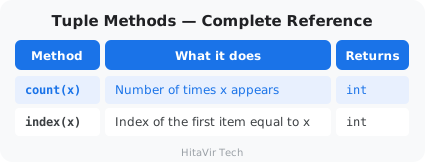
Example 1 — Creating and Unpacking a Tuple
tuple_basics.py
# ============================================
# HitaVir Tech - Tuples: Creating and Unpacking
# ============================================

# A tuple is an ordered, IMMUTABLE collection.
db_config = ("prod-db.hitavir.tech", 5432, "hitavir_prod")

# Access by index, exactly like a list.
print(f"Host: {db_config[0]}")
print(f"Port: {db_config[1]}")

# Tuple unpacking — assign every item to a variable in one line.
host, port, database = db_config
print(f"Unpacked -> {host} : {port} / {database}")

# A single-item tuple NEEDS a trailing comma.
not_a_tuple = ("solo")     # this is just a string
real_tuple = ("solo",)     # this is a tuple
print(f"{type(not_a_tuple).__name__} vs {type(real_tuple).__name__}")

# Immutability — uncommenting the next line raises a TypeError.
# db_config[1] = 5433
Run it:
python tuple_basics.py
Example 2 — The Two Tuple Methods: count(), index()
tuple_methods.py
# ============================================
# HitaVir Tech - Tuples: count() and index()
# ============================================

regions = ("North", "South", "North", "East", "North", "West")

# count(x) — how many times a value appears.
print(f"'North' count: {regions.count('North')}")

# index(x) — position of the first match.
print(f"First 'East':  index {regions.index('East')}")

# Why tuples? They are lighter than lists and protect data that must
# not change — coordinates, fixed pairs, credentials.
point = (12.97, 77.59)   # (latitude, longitude)
print(f"Coordinates:   {point}")
Run it:
python tuple_methods.py
Sets — Unordered Collections of Unique Values
A set stores unique values with no order. It is the fastest way to deduplicate data and to test membership (O(1)), and it gives you mathematical set operations for free.
Set Methods — Complete Reference
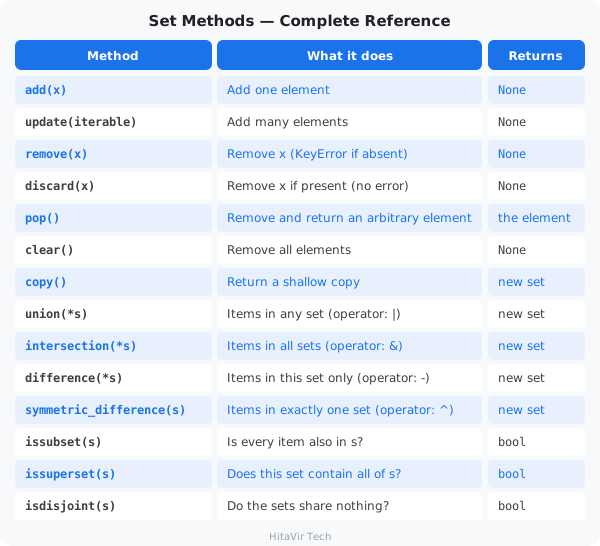
Example 1 — Creating and Adding: add(), update()
set_add.py
# ============================================
# HitaVir Tech - Sets: Creating and Adding
# ============================================

# A set stores UNIQUE values. Building one from a list deduplicates it.
raw_ids = [101, 102, 101, 103, 102, 104]
unique_ids = set(raw_ids)
print(f"Raw:    {raw_ids}")
print(f"Unique: {unique_ids}")

# add(x) — insert ONE value (duplicates are silently ignored).
unique_ids.add(105)
unique_ids.add(101)        # already present -> no effect
print(f"add:    {unique_ids}")

# update(iterable) — insert MANY values at once.
unique_ids.update([106, 107, 108])
print(f"update: {unique_ids}")

# An EMPTY set must use set() — {} creates an empty dict, not a set.
empty = set()
print(f"Empty set type: {type(empty).__name__}")
Run it:
python set_add.py
Example 2 — Removing: remove(), discard(), pop(), clear()
set_remove.py
# ============================================
# HitaVir Tech - Sets: Removing Items
# ============================================

active_users = {"alice", "bob", "charlie", "diana", "eve"}
print(f"Start:        {active_users}")

# discard(x) — remove if present; does NOTHING if missing (safe).
active_users.discard("bob")
active_users.discard("zoe")     # not there -> no error
print(f"discard:      {active_users}")

# remove(x) — remove if present; raises KeyError if missing (strict).
active_users.remove("alice")
print(f"remove:       {active_users}")

# pop() — remove and return an ARBITRARY item (a set has no order).
removed = active_users.pop()
print(f"pop():        {removed!r}  ->  {active_users}")

# clear() — empty the set.
active_users.clear()
print(f"clear():      {active_users}")
Run it:
python set_remove.py
Example 3 — Set Algebra: union, intersection, difference, symmetric_difference
set_algebra.py
# ============================================
# HitaVir Tech - Sets: Comparing Two Groups
# ============================================

# Which students are in the chess club vs the coding club?
chess_club = {"Asha", "Ravi", "Meena", "Diana"}
coding_club = {"Meena", "Diana", "Eve", "Frank"}

# union — everyone in EITHER club.
print(f"In any club    (|): {chess_club | coding_club}")
print(f"union method      : {chess_club.union(coding_club)}")

# intersection — only students in BOTH clubs.
print(f"In both clubs  (&): {chess_club & coding_club}")

# difference — in chess club but NOT in coding club.
print(f"Only chess     (-): {chess_club - coding_club}")

# symmetric_difference — in exactly ONE club, not both.
print(f"In just one    (^): {chess_club ^ coding_club}")
Run it:
python set_algebra.py
Example 4 — Relationship Tests: issubset(), issuperset(), isdisjoint()
set_relations.py
# ============================================
# HitaVir Tech - Sets: Relationship Tests
# ============================================

# A recipe needs some ingredients; our kitchen has these on the shelf.
needed = {"flour", "sugar", "eggs"}
pantry = {"flour", "sugar", "eggs", "salt", "butter"}
cleaning = {"soap", "sponge"}

# issubset() — are ALL the needed ingredients on the shelf?
print(f"Have everything needed?  {needed.issubset(pantry)}")

# issuperset() — does the pantry cover every needed ingredient?
print(f"Pantry covers the recipe?{pantry.issuperset(needed)}")

# isdisjoint() — do two sets share NOTHING in common?
print(f"Food vs cleaning overlap?{needed.isdisjoint(cleaning)}")

# A handy follow-up: what (if anything) are we missing?
missing = needed - pantry
print(f"Missing ingredients:     {missing or 'none — ready to bake!'}")
Run it:
python set_relations.py
Dictionaries — Key-Value Mappings
A dictionary maps keys to values and looks up values by key in O(1) time. It is the natural fit for a single record, a JSON object, or any named configuration.
Dict Methods — Complete Reference
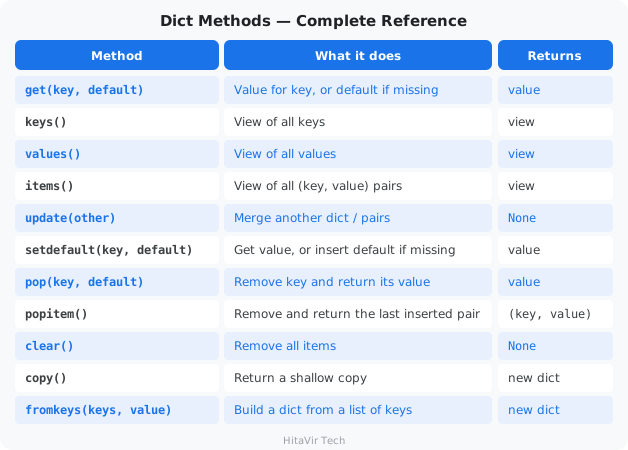
Example 1 — Accessing Data: get(), keys(), values(), items()
dict_access.py
# ============================================
# HitaVir Tech - Dictionaries: Accessing Data
# ============================================

employee = {
    "id": 101,
    "name": "Priya Sharma",
    "department": "Data Engineering",
    "salary": 85000,
}

# Direct access with [] — raises KeyError if the key is missing.
print(f"Name:    {employee['name']}")

# get(key, default) — safe access; returns the default instead of crashing.
print(f"Manager: {employee.get('manager', 'Not assigned')}")

# keys() / values() / items() — views you can loop over.
print(f"Keys:    {list(employee.keys())}")
print(f"Values:  {list(employee.values())}")

# items() is the standard way to iterate a dictionary.
print("Record:")
for key, value in employee.items():
    print(f"  {key:<12}: {value}")
Run it:
python dict_access.py
Example 2 — Adding and Updating: update(), setdefault()
dict_update.py
# ============================================
# HitaVir Tech - Dictionaries: Adding and Updating
# ============================================

settings = {"sound": "on", "level": 1}
print(f"Start:      {settings}")

# [] assignment — change an existing key or add a new one.
settings["level"] = 2            # update existing key
settings["player"] = "Asha"      # add a brand new key
print(f"[] set:     {settings}")

# update() — merge another dict (or key/value pairs) in one call.
settings.update({"difficulty": "easy", "lives": 3})
print(f"update:     {settings}")

# setdefault(key, default) — return the value, OR insert it if missing.
settings.setdefault("sound", "off")   # key exists -> left unchanged
settings.setdefault("paused", False)  # key is new -> inserted
print(f"setdefault: {settings}")
Run it:
python dict_update.py
Example 3 — Removing Data: pop(), popitem(), clear()
dict_remove.py
# ============================================
# HitaVir Tech - Dictionaries: Removing Data
# ============================================

record = {"id": 1, "name": "Alice", "temp": "x", "debug": True}
print(f"Start:      {record}")

# pop(key) — remove a key and return its value.
name = record.pop("name")
print(f"pop:        {name!r}  ->  {record}")

# pop(key, default) — safe pop that won't crash on a missing key.
missing = record.pop("ghost", "not found")
print(f"pop ghost:  {missing!r}")

# popitem() — remove and return the LAST inserted (key, value) pair.
last_pair = record.popitem()
print(f"popitem:    {last_pair}  ->  {record}")

# del — delete a key by name.
del record["temp"]
print(f"del:        {record}")

# clear() — empty the dictionary.
record.clear()
print(f"clear:      {record}")
Run it:
python dict_remove.py
Example 4 — Building and Copying: fromkeys(), copy(), membership
dict_utils.py
# ============================================
# HitaVir Tech - Dictionaries: fromkeys, copy, membership
# ============================================

# fromkeys(keys, value) — build a dict from a list of keys.
columns = ["id", "name", "email"]
schema = dict.fromkeys(columns, "string")
print(f"fromkeys:   {schema}")

# Membership (in) tests KEYS by default — a fast O(1) lookup.
print(f"'name' in schema?  {'name' in schema}")
print(f"'phone' in schema? {'phone' in schema}")

# copy() — a shallow copy so edits don't touch the original.
original = {"a": 1, "b": 2}
clone = original.copy()
clone["c"] = 3
print(f"Original:   {original}")
print(f"Copy:       {clone}")
Run it:
python dict_utils.py
List of Dictionaries — The Data Engineering Standard
This is the single most common pattern in data engineering. A CSV file, an API response, and a database query result all arrive as a list of dictionaries: the list is the rows, each dictionary is one row.
list_of_dicts.py
# ============================================
# HitaVir Tech - List of Dicts: Filter, Aggregate, Group
# ============================================

from collections import defaultdict

sales_data = [
    {"date": "2026-04-01", "product": "Laptop", "amount": 999.99,
     "region": "North"},
    {"date": "2026-04-01", "product": "Mouse", "amount": 29.99,
     "region": "South"},
    {"date": "2026-04-02", "product": "Keyboard", "amount": 79.99,
     "region": "North"},
    {"date": "2026-04-02", "product": "Monitor", "amount": 449.99,
     "region": "East"},
    {"date": "2026-04-03", "product": "Laptop", "amount": 999.99,
     "region": "West"},
]

# Filter — keep only sales above $100 (list comprehension).
big_sales = [s for s in sales_data if s["amount"] > 100]
print(f"Sales > $100: {len(big_sales)}")

# Aggregate — total revenue (generator expression into sum()).
total_revenue = sum(s["amount"] for s in sales_data)
print(f"Total revenue: ${total_revenue:,.2f}")

# Group by region — defaultdict avoids manual "if key in dict" checks.
by_region = defaultdict(float)
for sale in sales_data:
    by_region[sale["region"]] += sale["amount"]

print("\nRevenue by region:")
for region, total in sorted(by_region.items()):
    print(f"  {region:<6}: ${total:,.2f}")
Run it:
python list_of_dicts.py
HitaVir Tech says: "A list of dictionaries is the bread and butter of data engineering. It is how APIs return data, how you process CSV rows, and how you pass data between pipeline stages. Master this pattern."
Data Structure Comparison Table — Interview Reference
This table is asked in every Python interview for Data Engineering roles. Memorize it.
Core Comparison
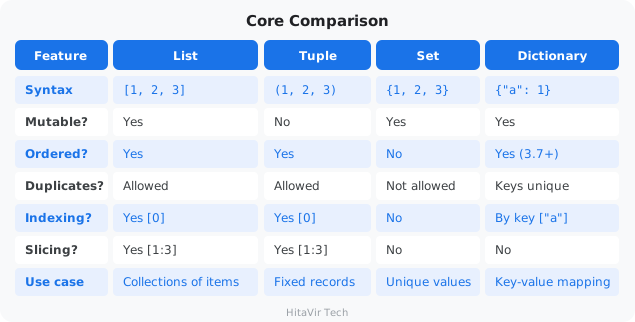
Performance Comparison (Big-O)
What is "Big-O"?
Big-O describes how much slower an operation gets as your dataset grows. O(1) means "instant — the same speed for 10 rows or 10 million." O(n) means "scales with size — 10× the data takes 10× longer." For data engineers handling millions of rows, this matters.
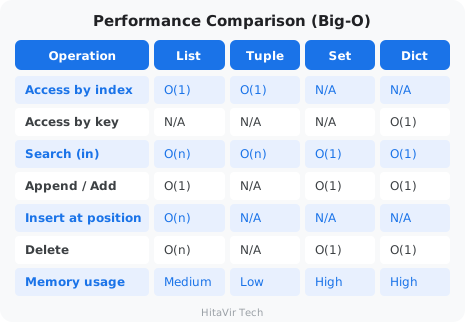
When to Use What — Data Engineering Guide
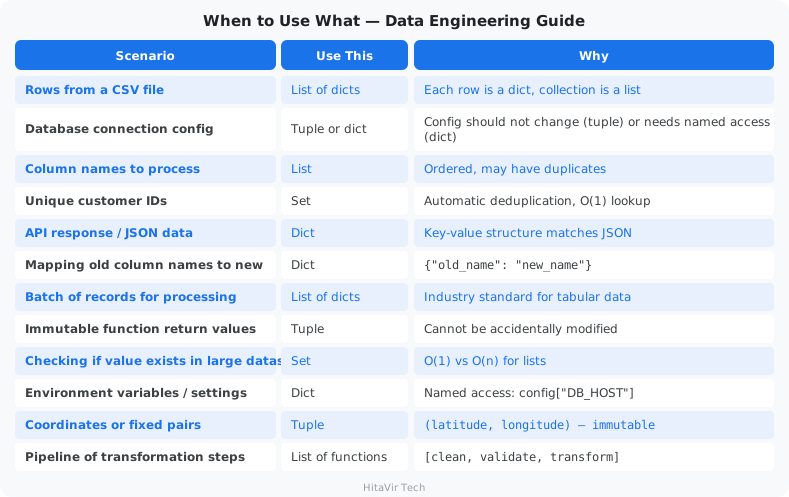
Quick Memory Aid for Interviews
List  = Shopping cart     → ordered, changeable, duplicates OK
Tuple = ID card           → ordered, fixed, cannot be changed
Set   = Unique stamps     → unordered, no duplicates, fast lookup
Dict  = Phone book        → name→number pairs, fast lookup by key
HitaVir Tech says: "In interviews, they will ask: ‘When would you use a set instead of a list?' The answer: when you need unique values and fast O(1) lookups. A set checks membership instantly; a list scans every element. For 10 million records, that is the difference between milliseconds and minutes."
Assignment 4 — Sales Aggregator
Goal: Use every Python data structure to build a small sales aggregator.
The scenario: Marketing wants three answers from yesterday's sales: revenue per region, the list of unique customers, and the top-spending customer.
Tasks:
- Create
assignment_04_data_structures.py. - Use this input data:
sales = [
    {"customer": "Alice",  "region": "North", "amount": 1500},
    {"customer": "Bob",    "region": "South", "amount":  800},
    {"customer": "Alice",  "region": "North", "amount": 2300},
    {"customer": "Carol",  "region": "East",  "amount": 1200},
    {"customer": "Bob",    "region": "South", "amount":  600},
    {"customer": "David",  "region": "West",  "amount":  450},
    {"customer": "Carol",  "region": "East",  "amount":  900},
]
- Build:
revenue_by_region(adict) -> total amount per regionunique_customers(aset) -> distinct customer namesrevenue_by_customer(adict) -> total amount per customertop_customer(atupleof(name, amount)) -> the highest-spender
- Print a clean report:
Revenue by Region:
  East   : $2,100.00
  North  : $3,800.00
  South  : $1,400.00
  West   :   $450.00

Unique customers: 4
Names: ['Alice', 'Bob', 'Carol', 'David']

Top customer: Alice ($3,800.00)
Success criteria:
- [ ] Uses
dict,set,list, andtuple(all four) - [ ] Regions printed in alphabetical order
- [ ] Customer list sorted alphabetically
- [ ] Top customer =
("Alice", 3800) - [ ] Numbers formatted with thousands separator and 2 decimals
Stretch goal: Replace the manual loops with defaultdict(float) and a dictionary comprehension. Then replace the for-loop top-customer logic with max(revenue_by_customer.items(), key=lambda x: x[1]).
What You Have Learnt on This Page
By the end of this page you should be able to confidently:
- Choose the right structure — string (text), list (ordered, mutable), tuple (locked), set (unique), dict (key→value)
- Use every list method —
append,extend,insert,remove,pop,clear,index,count,sort,reverse,copy— and knowsort()mutates whilesorted()returns a new list - Use the everyday string methods —
upper,lower,title,strip,replace,split,join,find,count,startswith,isdigit— and remember strings are immutable, so each returns a new string - Apply the built-in functions that work on any sequence —
len,sum,min,max,sorted,reversed,any,all,enumerate,zip - Use the two tuple methods (
count,index) and unpack tuples cleanly - Use every set method —
add,update,remove,discard,pop,clear— plus set algebra (union,intersection,difference,symmetric_difference) and relationship tests (issubset,issuperset,isdisjoint) - Use every dict method —
get,keys,values,items,update,setdefault,pop,popitem,clear,copy,fromkeys - Combine them into the list-of-dicts pattern to filter, aggregate, and group real data
PEP 8 — Style Rules to Apply Strictly to Data Structures
Real pipeline code lives or dies on how cleanly your data structures are written. Apply these rules every single time:
- For multi-line literals, add a trailing comma so diffs show one-line additions only
- Use dict / list comprehensions when they fit on one readable line — otherwise use a
forloop - Use
if not records:for empty checks, neverlen(records) == 0 - Prefer double quotes consistently for keys:
{"name": "Alice"} - Avoid mutable default arguments — never
def f(x=[]):(subtle bug); usedef f(x=None):then assign inside - Pick
defaultdictorCounterfromcollectionsover manualif key in d:checks
Inspiration for the road ahead:
"Bad programmers worry about the code. Good programmers worry about data structures and their relationships." — Linus Torvalds
Why file handling matters in DE
Every data pipeline starts and ends with a file. You read raw data from a file, transform it, and write the cleaned result to another file. The two formats you will use 95% of the time are CSV and JSON.
Quick definitions:
- CSV (Comma-Separated Values) — a plain-text spreadsheet. Each line is a row; commas separate the columns.
- JSON (JavaScript Object Notation) — a text format for structured/nested data. Looks like Python dictionaries.
- Log file — a plain-text file where every line is a timestamped event (used for debugging).
Create Sample Data Files
create_sample_data.py
"""
HitaVir Tech - Create sample data files for practice
"""
import csv
import json

# --- Create CSV file ---
sales_data = [
    ["order_id", "customer", "product", "quantity", "price", "date", "region"],
    [1001, "Alice Johnson", "Laptop", 1, 999.99, "2026-04-01", "North"],
    [1002, "Bob Smith", "Mouse", 5, 29.99, "2026-04-01", "South"],
    [1003, "Charlie Brown", "Keyboard", 2, 79.99, "2026-04-01", "North"],
    [1004, "", "Monitor", 1, 449.99, "2026-04-02", "East"],
    [1005, "Diana Prince", "Laptop", 2, 999.99, "2026-04-02", "West"],
    [1006, "Eve Wilson", "", 3, 29.99, "2026-04-02", "South"],
    [1007, "Frank Miller", "Keyboard", 0, 79.99, "2026-04-03", "North"],
    [1008, "Grace Lee", "Headphones", 1, 149.99, "2026-04-03", "East"],
    [1009, "Henry Davis", "Monitor", 1, 449.99, "2026-04-03", "West"],
    [1010, "Ivy Chen", "Laptop", 1, -999.99, "2026-04-03", "North"],
]

with open("sales_raw.csv", "w", newline="") as f:
    writer = csv.writer(f)
    writer.writerows(sales_data)
print("Created: sales_raw.csv")

# --- Create JSON config ---
config = {
    "pipeline_name": "HitaVir Sales ETL",
    "version": "1.0.0",
    "source": {
        "type": "csv",
        "path": "sales_raw.csv"
    },
    "rules": {
        "max_null_percent": 0.05,
        "min_quantity": 1,
        "min_price": 0.01
    },
    "output": {
        "path": "sales_cleaned.csv",
        "report_path": "pipeline_report.json"
    }
}

with open("pipeline_config.json", "w") as f:
    json.dump(config, f, indent=2)
print("Created: pipeline_config.json")

# --- Create log file ---
logs = """[2026-04-05 08:00:01] INFO: Pipeline started
[2026-04-05 08:00:02] INFO: Loading sales_raw.csv
[2026-04-05 08:00:03] WARNING: Found 2 records with missing customer names
[2026-04-05 08:00:04] ERROR: Record 1010 has negative price
[2026-04-05 08:00:05] INFO: Cleaned 10 records, 2 rejected
[2026-04-05 08:00:06] INFO: Pipeline completed in 5.2s
"""

with open("pipeline.log", "w") as f:
    f.write(logs)
print("Created: pipeline.log")

print("\nAll sample files created successfully!")
Run it:
python create_sample_data.py
What is the with-open block?
with open(...) as f: is the safe way to open files in Python. The with block automatically closes the file when you are done — even if an error happens inside. This prevents the "file left open and locked" bug.
Reading and Writing CSV Files
What is csv.DictReader?
csv.DictReader reads each row of a CSV as a dictionary where the keys are the column names from the header row. Instead of remembering "column 4 is price," you write row["price"]. Cleaner, safer, easier.
file_csv.py
"""
HitaVir Tech - CSV File Handling
"""
import csv

# --- READ CSV ---
print("=" * 60)
print("READING CSV FILE")
print("=" * 60)

records = []
with open("sales_raw.csv", "r") as f:
    reader = csv.DictReader(f)
    for row in reader:
        records.append(row)

print(f"Loaded {len(records)} records\n")
print("First 3 records:")
for i, record in enumerate(records[:3]):
    print(f"  {i+1}. Order {record['order_id']}: "
          f"{record['customer']} bought {record['quantity']}x {record['product']} "
          f"@ ${record['price']}")

# --- PROCESS CSV ---
# Validate every record; bad ones go to a rejected list, good ones to cleaned
print(f"\n{'=' * 60}")
print("PROCESSING CSV DATA")
print("=" * 60)

cleaned = []
rejected = []

for record in records:
    # Convert numeric fields (CSV cells are always strings)
    record["quantity"] = int(record["quantity"])
    record["price"] = float(record["price"])

    # Validation
    issues = []
    if not record["customer"]:
        issues.append("missing customer")
    if not record["product"]:
        issues.append("missing product")
    if record["quantity"] <= 0:
        issues.append(f"invalid quantity: {record['quantity']}")
    if record["price"] <= 0:
        issues.append(f"invalid price: {record['price']}")

    if issues:
        record["rejection_reason"] = "; ".join(issues)
        rejected.append(record)
        print(f"  REJECTED Order {record['order_id']}: {record['rejection_reason']}")
    else:
        record["total"] = round(record["price"] * record["quantity"], 2)
        cleaned.append(record)

print(f"\nCleaned: {len(cleaned)} records")
print(f"Rejected: {len(rejected)} records")

# --- WRITE CSV ---
print(f"\n{'=' * 60}")
print("WRITING CLEANED CSV")
print("=" * 60)

fieldnames = ["order_id", "customer", "product", "quantity", "price", "total", "date", "region"]

with open("sales_cleaned.csv", "w", newline="") as f:
    writer = csv.DictWriter(f, fieldnames=fieldnames)
    writer.writeheader()
    writer.writerows(cleaned)

print(f"Saved {len(cleaned)} records to sales_cleaned.csv")

# Display results
total_revenue = sum(r["total"] for r in cleaned)
print(f"Total revenue: ${total_revenue:,.2f}")
Run it:
python file_csv.py
CSV File Mode Cheat Sheet
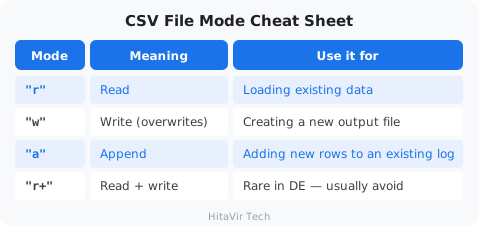
Reading and Writing JSON Files
JSON ↔ Python dictionary: JSON is text; a Python dict is in-memory. json.load() converts JSON text → Python dict. json.dump() does the reverse.
file_json.py
"""
HitaVir Tech - JSON File Handling
"""
import json

# --- READ JSON ---
print("=" * 60)
print("READING JSON CONFIG")
print("=" * 60)

with open("pipeline_config.json", "r") as f:
    config = json.load(f)

print(f"Pipeline: {config['pipeline_name']}")
print(f"Version: {config['version']}")
print(f"Source: {config['source']['path']}")
print(f"Max null %: {config['rules']['max_null_percent']}")

# --- CREATE PIPELINE REPORT (JSON) ---
print(f"\n{'=' * 60}")
print("GENERATING PIPELINE REPORT")
print("=" * 60)

report = {
    "pipeline": config["pipeline_name"],
    "run_date": "2026-04-05",
    "status": "completed",
    "metrics": {
        "total_input_records": 10,
        "cleaned_records": 7,
        "rejected_records": 3,
        "success_rate": 70.0,
        "total_revenue": 4339.89,
        "processing_time_seconds": 5.2
    },
    "top_products": [
        {"product": "Laptop", "revenue": 2999.97, "orders": 3},
        {"product": "Monitor", "revenue": 449.99, "orders": 1},
        {"product": "Headphones", "revenue": 149.99, "orders": 1}
    ],
    "rejections": [
        {"order_id": 1004, "reason": "missing customer"},
        {"order_id": 1006, "reason": "missing product"},
        {"order_id": 1007, "reason": "invalid quantity: 0"},
        {"order_id": 1010, "reason": "invalid price: -999.99"}
    ]
}

with open("pipeline_report.json", "w") as f:
    json.dump(report, f, indent=2)  # indent=2 makes the file human-readable

print("Report saved to pipeline_report.json")
print(f"\nPipeline Status: {report['status']}")
print(f"Success Rate: {report['metrics']['success_rate']}%")
print(f"Revenue: ${report['metrics']['total_revenue']:,.2f}")
Run it:
python file_json.py
JSON Function Cheat Sheet
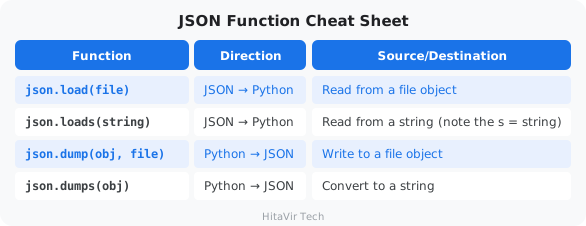
Reading Text/Log Files
file_logs.py
"""
HitaVir Tech - Log File Analysis
"""

# --- Read and analyze log file ---
print("=" * 60)
print("LOG FILE ANALYSIS")
print("=" * 60)

with open("pipeline.log", "r") as f:
    lines = f.readlines()  # returns a list of strings, one per line

info_count = 0
warning_count = 0
error_count = 0
errors = []

for line in lines:
    line = line.strip()
    if not line:
        continue
    if "INFO:" in line:
        info_count += 1
    elif "WARNING:" in line:
        warning_count += 1
    elif "ERROR:" in line:
        error_count += 1
        errors.append(line)

print(f"Total log entries: {len([l for l in lines if l.strip()])}")
print(f"INFO: {info_count}")
print(f"WARNING: {warning_count}")
print(f"ERROR: {error_count}")

if errors:
    print(f"\nError details:")
    for err in errors:
        print(f"  {err}")
Run it:
python file_logs.py
HitaVir Tech says: "File handling is where theory meets reality. Every data pipeline starts with reading a file and ends with writing a file. CSV and JSON are the two formats you will use most."
Assignment 5 — CSV to JSON Region Report
Goal: Read a CSV, transform the data, and write a JSON summary — the most common file-handling task in real pipelines.
The scenario: Finance asked for a daily JSON file showing total revenue per region. They will load the JSON into their dashboard.
Tasks:
- Make sure
sales_raw.csvexists in your working folder (if not, runpython create_sample_data.pyfrom the codelab). - Create
assignment_05_files.py. - Read
sales_raw.csvusingcsv.DictReader. - Skip records that have empty
customeror emptyproduct(these are bad rows). - Convert
quantityandpriceto numbers, computetotal = quantity * price. - Skip records where
quantity <= 0orprice <= 0. - Group by
region, summing thetotal. - Write the result to
region_summary.jsonwithindent=2. Format:
{
  "report_date": "2026-04-30",
  "currency": "USD",
  "by_region": {
    "East":  599.98,
    "North": 4079.95,
    "South": 149.95,
    "West":  1449.98
  },
  "total": 6279.86
}
- After writing the file, read it back with
json.load()and print "Report verified — total: $X.XX" using the value from the loaded file.
Success criteria:
- [ ] Uses
csv.DictReaderwithwith open(...) - [ ] Uses
json.dump(..., indent=2) - [ ] Skips rows with empty fields and non-positive numbers
- [ ] JSON file is valid (re-readable by
json.load) - [ ] Regions appear in alphabetical order in the output
Stretch goal: Also write a rejected_records.csv containing every skipped row with a new column reason explaining why it was rejected.
What You Have Learnt on This Page
By the end of this page you should be able to confidently:
- Read CSV files with
csv.readerandcsv.DictReader - Write CSV files with
csv.writerandcsv.DictWriter(header + rows) - Read and write JSON with
json.load,json.loads,json.dump,json.dumps - Use the
with open(...)context manager so files always close - Set the right encoding (
encoding="utf-8") andnewline=""on Windows - Append to log/text files for audit trails
PEP 8 — Style Rules to Apply Strictly to File I/O
Files are the boundary of every pipeline. Boundary code that breaks PEP 8 turns into the world's worst on-call ticket. Apply these rules every single time you touch a file:
- Always use
with open(...) as f:— never manualopen()thenf.close() - Always pass
encoding="utf-8"explicitly (Windows defaults bite) - Group imports correctly —
csv,json,pathlibare stdlib (Group 1) - Prefer
pathlib.Pathoveros.pathstring-joining (modern + cross-platform) - Use
json.dump(obj, f, indent=2)so output is diff-friendly - Keep file paths in constants at the top:
INPUT_PATH = Path("data/sales.csv")
Inspiration for the road ahead:
"Data is the new oil. It is valuable, but if unrefined it cannot really be used." — Clive Humby
What is an "error" or "exception"?
When Python tries to do something impossible — divide by zero, open a missing file, convert "abc" to a number — it raises an exception and the program crashes. Error handling is how you catch those exceptions and respond gracefully instead of crashing.
What is logging?
Logging is writing timestamped messages about what your pipeline did, to a file or the console. When something fails at 3 AM in production, the log is the only way to find out what happened.
Why this matters in DE
Production pipelines must NEVER silently crash. They must fail gracefully, log every problem, and let on-call engineers debug the next morning.
try-except — Catching Errors
The pattern:
try:— "try to do this risky thing"except SomeError:— "if THIS specific error happens, do this instead"finally:— "do this no matter what (cleanup)"
Visual Flow — How try / except / finally runs
               +--------------+
               |   try:       |
               |   risky_code |
               +--------------+
                      |
              did it raise an error?
               /                  \
             NO                   YES
              |                    |
              v                    v
     +----------------+   +-------------------+
     | skip except    |   | matching except:  |
     | block          |   | run handler code  |
     +----------------+   +-------------------+
              \                    /
               \                  /
                v                v
               +------------------+
               |    finally:      |   <-- ALWAYS runs
               |    cleanup       |       (close file,
               +------------------+        release lock)
                        |
                        v
                  continue program
error_handling.py
"""
HitaVir Tech - Error Handling & Logging
"""
import logging
from datetime import datetime

# --- Setup logging ---
# Level INFO means: log INFO, WARNING, ERROR, CRITICAL (skip DEBUG)
logging.basicConfig(
    level=logging.INFO,
    format="%(asctime)s [%(levelname)s] %(message)s",
    datefmt="%Y-%m-%d %H:%M:%S",
    handlers=[
        logging.FileHandler("etl_pipeline.log"),  # write to file
        logging.StreamHandler()                    # also print to console
    ]
)

logger = logging.getLogger("HitaVirETL")

# --- try-except basics ---
print("=" * 60)
print("ERROR HANDLING BASICS")
print("=" * 60)

# Division by zero
try:
    result = 100 / 0
except ZeroDivisionError:
    logger.error("Cannot divide by zero!")

# File not found
try:
    with open("nonexistent_file.csv", "r") as f:
        data = f.read()
except FileNotFoundError:
    logger.warning("File not found — using default data")

# Type conversion error
try:
    value = int("not_a_number")
except ValueError as e:
    logger.error(f"Type conversion failed: {e}")

# --- Real pipeline with error handling ---
print(f"\n{'=' * 60}")
print("PRODUCTION-GRADE PIPELINE")
print("=" * 60)

def safe_extract(filepath):
    """Extract data with error handling."""
    logger.info(f"Starting extraction from {filepath}")
    try:
        with open(filepath, "r") as f:
            import csv
            reader = csv.DictReader(f)
            records = list(reader)
        logger.info(f"Extracted {len(records)} records")
        return records
    except FileNotFoundError:
        logger.error(f"Source file not found: {filepath}")
        return []
    except Exception as e:
        logger.critical(f"Unexpected error during extraction: {e}")
        return []

def safe_transform(records):
    """Transform data with per-record error handling."""
    logger.info(f"Starting transformation of {len(records)} records")
    cleaned = []
    errors = 0

    for i, record in enumerate(records):
        try:
            record["price"] = float(record.get("price", 0))
            record["quantity"] = int(record.get("quantity", 0))

            if record["price"] <= 0 or record["quantity"] <= 0:
                raise ValueError("Invalid price or quantity")

            record["total"] = round(record["price"] * record["quantity"], 2)
            cleaned.append(record)
        except (ValueError, TypeError) as e:
            errors += 1
            logger.warning(f"Record {i+1} skipped: {e}")

    logger.info(f"Transformation complete: {len(cleaned)} valid, {errors} errors")
    return cleaned

def safe_load(records, output_path):
    """Load data with error handling."""
    logger.info(f"Loading {len(records)} records to {output_path}")
    try:
        import csv
        fieldnames = ["order_id", "customer", "product", "quantity", "price", "total", "date", "region"]
        with open(output_path, "w", newline="") as f:
            writer = csv.DictWriter(f, fieldnames=fieldnames, extrasaction="ignore")
            writer.writeheader()
            writer.writerows(records)
        logger.info(f"Successfully saved to {output_path}")
        return True
    except Exception as e:
        logger.critical(f"Failed to save output: {e}")
        return False

# --- Run the pipeline ---
logger.info("=" * 40)
logger.info("HitaVir Tech ETL Pipeline Starting")
logger.info("=" * 40)

start_time = datetime.now()

data = safe_extract("sales_raw.csv")
if data:
    cleaned = safe_transform(data)
    if cleaned:
        success = safe_load(cleaned, "sales_output.csv")

end_time = datetime.now()
duration = (end_time - start_time).total_seconds()

logger.info(f"Pipeline finished in {duration:.2f}s")
logger.info("=" * 40)

print(f"\nLog file saved to: etl_pipeline.log")
Run it:
python error_handling.py
Common Python Exceptions in Data Engineering
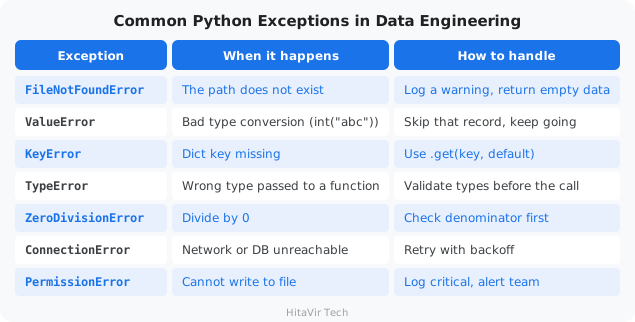
Logging Levels — When to Use Each
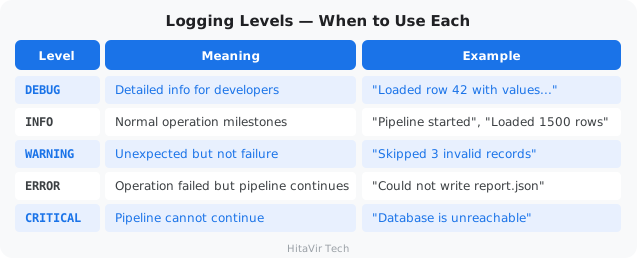
HitaVir Tech says: "In production, errors WILL happen. The question is not if, but when. Good error handling means your pipeline fails gracefully, logs the problem, and makes debugging easy."
Assignment 6 — Bullet-Proof CSV Reader
Goal: Build one reusable function that can read any CSV without ever crashing the parent program.
The scenario: Your team's pipelines keep dying because of bad input files. Build a single safe_read_csv() they can all import.
Tasks:
- Create
assignment_06_errors.py. - Set up
loggingto write to botherrors.logAND the console, levelINFO, with a timestamp format. - Write
safe_read_csv(filepath)that:- Returns
[]if the file does not exist (log aWARNING) - Returns
[]if the file is unreadable for any other reason (logCRITICAL) - Otherwise reads with
csv.DictReader, skips rows that failint(row["quantity"])orfloat(row["price"]), and logs each skip as aWARNINGwith the row number and reason - Returns the list of valid rows
- Returns
- Test by calling
safe_read_csv()three times:- With
"missing_file.csv"-> should log a warning, return[] - With
"sales_raw.csv"-> should log skipped rows, return cleaned list - With a temp file you create yourself containing 1 good row and 1 row with
price="abc"-> should keep 1, skip 1
- With
Sample log output:
2026-04-30 09:00:01 [WARNING] File not found: missing_file.csv
2026-04-30 09:00:02 [INFO]    Loading sales_raw.csv
2026-04-30 09:00:02 [WARNING] Row 7 skipped: invalid quantity '0'
2026-04-30 09:00:02 [WARNING] Row 10 skipped: invalid price '-999.99'
2026-04-30 09:00:02 [INFO]    Loaded 8 valid rows from sales_raw.csv
Success criteria:
- [ ] Uses
try/exceptwith specific exception types (no bareexcept:) - [ ] Uses
logging, neverprintfor status - [ ] Function never raises an unhandled exception under any input
- [ ] Both file and console show the same log lines
- [ ]
errors.logexists and is human-readable
Stretch goal: Add the @retry(max_attempts=3) decorator from the codelab and apply it to safe_read_csv so flaky network-mounted files get retried automatically.
What You Have Learnt on This Page
By the end of this page you should be able to confidently:
- Catch errors with
try/exceptusing specific exception classes - Distinguish
ValueError,KeyError,FileNotFoundError,TypeError, etc. - Use
elseandfinallyclauses correctly - Configure the
loggingmodule with levels (DEBUG / INFO / WARNING / ERROR / CRITICAL) - Write logs to both file and console simultaneously
- Replace every
print()in production code withlogger.info()/logger.error()
PEP 8 — Style Rules to Apply Strictly to Errors and Logging
Silent failures destroy data pipelines. Apply these rules every single time you handle an exception:
- Never write a bare
except:— it swallowsKeyboardInterruptand hides bugs - Catch the most specific exception you can:
except ValueError:notexcept Exception: - Re-raise with
raise(no argument) to preserve the traceback - Use
logging, notprint, for anything resembling status - Configure
logger = logging.getLogger(__name__)at the top of every module - Log WHY not just WHAT:
logger.warning("Skipped row %d: invalid price %s", i, val) - Add docstrings that mention
Raises:for any exception your function intentionally throws
Inspiration for the road ahead:
"Errors should never pass silently. Unless explicitly silenced." — Tim Peters, The Zen of Python
What is pandas?
pandas is the most-used Python library for working with tabular data (rows and columns). Think of it as Excel inside Python — but able to handle millions of rows, perform complex transformations, and integrate with every data tool.
What is a DataFrame?
A DataFrame is the central pandas object — a table with rows, columns, and an index. Every column has a name and a data type. It is what you get when you load a CSV via pd.read_csv(...).
Why DE engineers love pandas
One library handles: loading CSVs/Excel/JSON, cleaning nulls, filtering rows, joining tables, grouping/aggregating, and writing the result back out.
pandas_basics.py
"""
HitaVir Tech - pandas for Data Engineering
"""
import pandas as pd

# --- READ CSV INTO DATAFRAME ---
print("=" * 60)
print("LOADING DATA WITH PANDAS")
print("=" * 60)

df = pd.read_csv("sales_raw.csv")

print(f"Shape: {df.shape[0]} rows x {df.shape[1]} columns")
print(f"\nColumn names: {list(df.columns)}")
print(f"\nData types:\n{df.dtypes}")
print(f"\nFirst 5 rows:")
print(df.head())

# --- EXPLORE DATA ---
# describe() gives min/max/mean for every numeric column
# isnull().sum() counts missing values per column
print(f"\n{'=' * 60}")
print("DATA EXPLORATION")
print("=" * 60)

print("\nBasic statistics:")
print(df.describe())

print(f"\nMissing values per column:")
print(df.isnull().sum())

print(f"\nUnique products: {df['product'].nunique()}")
print(f"Unique regions: {df['region'].nunique()}")
print(f"Date range: {df['date'].min()} to {df['date'].max()}")

# --- CLEAN DATA ---
print(f"\n{'=' * 60}")
print("DATA CLEANING")
print("=" * 60)

# Remove rows with missing customer or product
df_clean = df.dropna(subset=["customer", "product"])
print(f"After dropping nulls: {len(df_clean)} rows (was {len(df)})")

# Remove invalid data (using boolean indexing)
df_clean = df_clean[df_clean["quantity"] > 0]
df_clean = df_clean[df_clean["price"] > 0]
print(f"After removing invalid: {len(df_clean)} rows")

# --- TRANSFORM DATA ---
print(f"\n{'=' * 60}")
print("DATA TRANSFORMATION")
print("=" * 60)

# Add calculated columns
df_clean = df_clean.copy()
df_clean["total"] = (df_clean["price"] * df_clean["quantity"]).round(2)
df_clean["price_category"] = df_clean["price"].apply(
    lambda p: "Premium" if p >= 200 else ("Mid" if p >= 50 else "Budget")
)

print(df_clean[["order_id", "product", "price", "quantity", "total", "price_category"]])

# --- AGGREGATE DATA ---
# groupby + agg = SQL's GROUP BY + COUNT/SUM/AVG
print(f"\n{'=' * 60}")
print("DATA AGGREGATION")
print("=" * 60)

# Revenue by region
print("\nRevenue by Region:")
region_summary = df_clean.groupby("region")["total"].agg(["sum", "count", "mean"]).round(2)
region_summary.columns = ["revenue", "orders", "avg_order"]
print(region_summary)

# Revenue by product
print("\nRevenue by Product:")
product_summary = df_clean.groupby("product")["total"].sum().sort_values(ascending=False)
print(product_summary)

# --- SAVE OUTPUT ---
print(f"\n{'=' * 60}")
print("SAVING RESULTS")
print("=" * 60)

df_clean.to_csv("sales_pandas_cleaned.csv", index=False)
print("Saved: sales_pandas_cleaned.csv")

region_summary.to_csv("region_report.csv")
print("Saved: region_report.csv")

print(f"\nTotal revenue: ${df_clean['total'].sum():,.2f}")
print(f"Average order value: ${df_clean['total'].mean():,.2f}")
print(f"Top product: {product_summary.index[0]} (${product_summary.iloc[0]:,.2f})")
Run it:
python pandas_basics.py
pandas Cheat Sheet — The 15 Methods You'll Use Daily
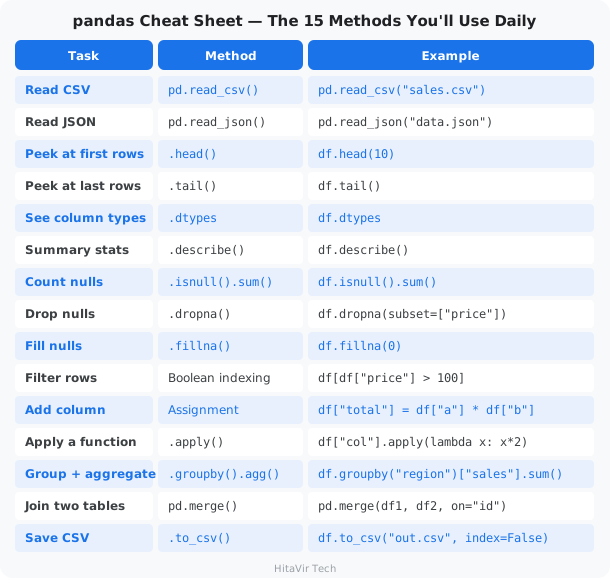
HitaVir Tech says: "pandas is to data engineers what a stethoscope is to doctors — you cannot work without it. Learn read_csv, groupby, merge, and apply, and you can handle 90% of data tasks."
Assignment 7 — Daily Sales Report with pandas
Goal: Practice the entire pandas workflow — read, clean, transform, group, save — on the sales dataset.
The scenario: The COO wants a daily sales report broken down by date AND region, with one row per (date, region) and revenue ranked.
Tasks:
- Create
assignment_07_pandas.py. - Read
sales_raw.csvinto a DataFramedf. - Print
df.shape,df.dtypes, anddf.isnull().sum(). - Drop rows where
customerorproductis null. - Keep only rows where
quantity > 0andprice > 0. - Add columns:
total = price * quantity(rounded to 2 decimals)is_premium = price > 200(boolean)
- Group by
["date", "region"]and aggregatetotalwithsum,count, andmean. Round to 2 decimals. - Sort the result by
total sumdescending. - Save to
daily_region_report.csv. - Print the top 3 (date, region) pairs by revenue.
Sample output (top section):
DataFrame shape: (10, 7)

Top 3 by revenue:
  2026-04-02 | West  | $1,999.98 | 1 order  | avg $1,999.98
  2026-04-01 | North | $1,159.97 | 2 orders | avg   $539.99
  2026-04-03 | West  |   $449.99 | 1 order  | avg   $449.99
Success criteria:
- [ ] Uses
read_csv,dropna, boolean indexing,assignor column-add,groupbywithagg, andto_csv - [ ] Output CSV has multi-column groupby (date + region)
- [ ] Top-3 print uses formatted strings with thousands separator
- [ ] No
SettingWithCopyWarningin the output (usedf = df.copy()after filtering)
Stretch goal: Add a pivot_table showing regions as rows and dates as columns, with total as the cell values. Save it as pivot_report.csv.
What You Have Learnt on This Page
By the end of this page you should be able to confidently:
- Create a DataFrame from a CSV with
pd.read_csv - Inspect data with
head(),tail(),info(),describe(),shape,dtypes - Clean missing data with
dropna,fillna, and boolean indexing - Add and transform columns with
df["new"] = ...ordf.assign(...) - Aggregate with
groupby(...).agg(...)for sums, means, counts - Sort with
sort_values(...), slice top-N with.head(N), write withto_csv
PEP 8 — Style Rules to Apply Strictly to pandas Code
pandas one-liners look elegant in tutorials and unreadable in production. Apply these rules every single time you write a DataFrame chain:
- Break long chains across multiple lines using
()parentheses for line continuation - Each method on its own line, indented one level
- Always
df = df.copy()after a filter to avoidSettingWithCopyWarning - Use double quotes for column names:
df["price"], neverdf['price']mixing - Prefer
.assign()for adding columns in a chain (no inplace mutation) - Never set
inplace=True— always reassign:df = df.dropna() - Constants at top:
INPUT_FILE = "sales.csv",MIN_PRICE = 0
Inspiration for the road ahead:
"Without data, you're just another person with an opinion." — W. Edwards Deming
What is ETL?
ETL stands for Extract, Transform, Load — the three universal stages of every data pipeline.
- Extract — pull raw data from a source (file, database, API)
- Transform — clean, validate, enrich, reshape it
- Load — save the result to a destination (file, warehouse, dashboard)
The ETL Pipeline You Are About to Build
                              HitaVir Tech Sales ETL
                              ----------------------

  +---------------+      +---------------+      +-------------------+
  |    EXTRACT    |      |   TRANSFORM   |      |       LOAD        |
  |               |      |               |      |                   |
  | sales_raw.csv | ---> |  validate     | ---> |  sales_cleaned.csv|
  |               |      |  type-cast    |      |  rejected.csv     |
  | input/        |      |  enrich       |      |  daily_report.json|
  +---------------+      |  categorize   |      +-------------------+
                         +---------------+               |
                                |                        v
                                v                +-------------------+
                         +---------------+       |    pipeline.log   |
                         | rejected.csv  |       |  (every step is   |
                         | (bad records) |       |   logged here)    |
                         +---------------+       +-------------------+

  Every arrow above is one Python function. Every function is logged.
  If a record fails validation, it goes to rejected.csv with the reason.
Time to build a real, production-quality ETL pipeline that combines everything you have learned: variables, control flow, functions, data structures, file I/O, error handling, and logging.
The Scenario
HitaVir Tech receives daily sales CSV files. You need to build an automated pipeline that:
- Reads the raw CSV
- Validates every record against business rules
- Cleans and transforms the data
- Generates summary reports
- Saves outputs with proper logging
mkdir -p pipeline_project/input pipeline_project/output pipeline_project/logs
The Pipeline Code
pipeline_project/etl_pipeline.py
"""
HitaVir Tech - Sales Data ETL Pipeline
=======================================
A production-quality ETL pipeline that processes daily sales data.

Usage:
    python etl_pipeline.py

Author: HitaVir Tech
Version: 1.0.0
"""

import csv
import json
import logging
import os
from datetime import datetime
from collections import defaultdict

# ============================================================
# CONFIGURATION
# All "knobs" of the pipeline live here, not buried in code
# ============================================================

CONFIG = {
    "input_file": "input/sales_raw.csv",
    "output_file": "output/sales_cleaned.csv",
    "report_file": "output/daily_report.json",
    "rejected_file": "output/rejected_records.csv",
    "log_file": "logs/pipeline.log",
    "rules": {
        "required_fields": ["order_id", "customer", "product", "quantity", "price"],
        "min_quantity": 1,
        "min_price": 0.01,
        "max_price": 100000,
        "valid_regions": ["North", "South", "East", "West"]
    }
}

# ============================================================
# LOGGING SETUP
# ============================================================

def setup_logging(log_file):
    """Configure logging to write to BOTH a file and the console."""
    os.makedirs(os.path.dirname(log_file), exist_ok=True)

    logging.basicConfig(
        level=logging.INFO,
        format="%(asctime)s [%(levelname)-8s] %(message)s",
        datefmt="%Y-%m-%d %H:%M:%S",
        handlers=[
            logging.FileHandler(log_file),
            logging.StreamHandler()
        ]
    )
    return logging.getLogger("HitaVirETL")

# ============================================================
# EXTRACT
# ============================================================

def extract(filepath, logger):
    """
    Extract: Read raw CSV data from source file.

    Returns:
        list[dict]: List of records, or empty list on failure.
    """
    logger.info(f"[EXTRACT] Reading from {filepath}")

    if not os.path.exists(filepath):
        logger.error(f"[EXTRACT] File not found: {filepath}")
        return []

    try:
        with open(filepath, "r", encoding="utf-8") as f:
            reader = csv.DictReader(f)
            records = list(reader)

        logger.info(f"[EXTRACT] Loaded {len(records)} records with columns: {reader.fieldnames}")
        return records
    except Exception as e:
        logger.critical(f"[EXTRACT] Failed to read file: {e}")
        return []

# ============================================================
# VALIDATE
# ============================================================

def validate_record(record, rules):
    """
    Validate a single record against business rules.

    Returns:
        tuple: (is_valid: bool, errors: list[str])
    """
    errors = []

    # Check required fields are present and non-empty
    for field in rules["required_fields"]:
        if not record.get(field, "").strip():
            errors.append(f"Missing required field: {field}")

    # Validate quantity
    try:
        qty = int(record.get("quantity", 0))
        if qty < rules["min_quantity"]:
            errors.append(f"Quantity {qty} below minimum {rules['min_quantity']}")
    except ValueError:
        errors.append(f"Invalid quantity: {record.get('quantity')}")

    # Validate price
    try:
        price = float(record.get("price", 0))
        if price < rules["min_price"]:
            errors.append(f"Price {price} below minimum {rules['min_price']}")
        if price > rules["max_price"]:
            errors.append(f"Price {price} above maximum {rules['max_price']}")
    except ValueError:
        errors.append(f"Invalid price: {record.get('price')}")

    # Validate region (if provided)
    region = record.get("region", "").strip()
    if region and region not in rules["valid_regions"]:
        errors.append(f"Invalid region: {region}")

    return len(errors) == 0, errors

# ============================================================
# TRANSFORM
# ============================================================

def transform(records, rules, logger):
    """
    Transform: Clean, validate, and enrich records.

    Returns:
        tuple: (cleaned_records, rejected_records)
    """
    logger.info(f"[TRANSFORM] Processing {len(records)} records")

    cleaned = []
    rejected = []

    for record in records:
        is_valid, errors = validate_record(record, rules)

        if not is_valid:
            record["rejection_reasons"] = "; ".join(errors)
            rejected.append(record)
            logger.warning(f"[TRANSFORM] Rejected order {record.get('order_id', '?')}: {errors}")
            continue

        # Type conversion (CSV strings → numbers)
        record["quantity"] = int(record["quantity"])
        record["price"] = float(record["price"])

        # Enrichment — add computed fields
        record["total"] = round(record["price"] * record["quantity"], 2)
        record["customer"] = record["customer"].strip().title()
        record["product"] = record["product"].strip().title()

        # Categorization
        if record["total"] >= 1000:
            record["tier"] = "Enterprise"
        elif record["total"] >= 200:
            record["tier"] = "Business"
        else:
            record["tier"] = "Consumer"

        cleaned.append(record)

    logger.info(f"[TRANSFORM] Result: {len(cleaned)} valid, {len(rejected)} rejected")
    return cleaned, rejected

# ============================================================
# LOAD
# ============================================================

def load(cleaned, rejected, config, logger):
    """
    Load: Save cleaned data and rejected records to files.
    """
    os.makedirs("output", exist_ok=True)

    # Save cleaned records
    if cleaned:
        fieldnames = ["order_id", "customer", "product", "quantity",
                       "price", "total", "tier", "date", "region"]
        with open(config["output_file"], "w", newline="", encoding="utf-8") as f:
            writer = csv.DictWriter(f, fieldnames=fieldnames, extrasaction="ignore")
            writer.writeheader()
            writer.writerows(cleaned)
        logger.info(f"[LOAD] Saved {len(cleaned)} cleaned records to {config['output_file']}")

    # Save rejected records (always useful for debugging)
    if rejected:
        fieldnames = ["order_id", "customer", "product", "quantity",
                       "price", "date", "region", "rejection_reasons"]
        with open(config["rejected_file"], "w", newline="", encoding="utf-8") as f:
            writer = csv.DictWriter(f, fieldnames=fieldnames, extrasaction="ignore")
            writer.writeheader()
            writer.writerows(rejected)
        logger.info(f"[LOAD] Saved {len(rejected)} rejected records to {config['rejected_file']}")

# ============================================================
# REPORT
# ============================================================

def generate_report(cleaned, rejected, duration, config, logger):
    """Generate a JSON pipeline run report."""
    total_input = len(cleaned) + len(rejected)
    success_rate = (len(cleaned) / total_input * 100) if total_input > 0 else 0

    # Aggregate metrics
    revenue_by_region = defaultdict(float)
    revenue_by_product = defaultdict(float)
    tier_counts = defaultdict(int)

    for record in cleaned:
        revenue_by_region[record["region"]] += record["total"]
        revenue_by_product[record["product"]] += record["total"]
        tier_counts[record["tier"]] += 1

    report = {
        "pipeline": "HitaVir Tech Sales ETL",
        "run_timestamp": datetime.now().strftime("%Y-%m-%d %H:%M:%S"),
        "duration_seconds": round(duration, 2),
        "summary": {
            "total_input": total_input,
            "cleaned": len(cleaned),
            "rejected": len(rejected),
            "success_rate": round(success_rate, 1)
        },
        "revenue": {
            "total": round(sum(r["total"] for r in cleaned), 2),
            "by_region": dict(sorted(revenue_by_region.items())),
            "by_product": dict(sorted(revenue_by_product.items(),
                                       key=lambda x: x[1], reverse=True))
        },
        "tier_distribution": dict(tier_counts)
    }

    with open(config["report_file"], "w") as f:
        json.dump(report, f, indent=2)
    logger.info(f"[REPORT] Saved to {config['report_file']}")

    return report

# ============================================================
# MAIN — ORCHESTRATOR
# Calls every step in the right order
# ============================================================

def run_pipeline():
    """Main pipeline orchestrator."""
    logger = setup_logging(CONFIG["log_file"])

    logger.info("=" * 60)
    logger.info("HitaVir Tech Sales ETL Pipeline — Starting")
    logger.info("=" * 60)

    start_time = datetime.now()

    # EXTRACT
    raw_data = extract(CONFIG["input_file"], logger)
    if not raw_data:
        logger.error("No data extracted. Pipeline aborted.")
        return

    # TRANSFORM
    cleaned, rejected = transform(raw_data, CONFIG["rules"], logger)

    # LOAD
    load(cleaned, rejected, CONFIG, logger)

    # REPORT
    end_time = datetime.now()
    duration = (end_time - start_time).total_seconds()
    report = generate_report(cleaned, rejected, duration, CONFIG, logger)

    # SUMMARY
    logger.info("=" * 60)
    logger.info("PIPELINE COMPLETE")
    logger.info(f"  Input: {report['summary']['total_input']} records")
    logger.info(f"  Cleaned: {report['summary']['cleaned']} records")
    logger.info(f"  Rejected: {report['summary']['rejected']} records")
    logger.info(f"  Success rate: {report['summary']['success_rate']}%")
    logger.info(f"  Total revenue: ${report['revenue']['total']:,.2f}")
    logger.info(f"  Duration: {duration:.2f}s")
    logger.info("=" * 60)


if __name__ == "__main__":
    run_pipeline()
What is the if-name-main idiom?
if __name__ == "__main__": is a standard Python idiom that means: "Only run run_pipeline() if this file is executed directly (python etl_pipeline.py), NOT if it is imported by another file." It is how you make a Python file work both as a script and as a reusable module.
Copy Sample Data and Run
cp sales_raw.csv pipeline_project/input/
cd pipeline_project
python etl_pipeline.py
Verify Outputs
echo "--- Cleaned Data ---"
cat output/sales_cleaned.csv

echo -e "\n--- Rejected Records ---"
cat output/rejected_records.csv

echo -e "\n--- Pipeline Report ---"
cat output/daily_report.json

echo -e "\n--- Pipeline Log ---"
cat logs/pipeline.log
Project Structure
pipeline_project/
├── etl_pipeline.py          ← Main pipeline script
├── input/
│   └── sales_raw.csv        ← Raw input data
├── output/
│   ├── sales_cleaned.csv    ← Cleaned output
│   ├── rejected_records.csv ← Failed records (for debugging)
│   └── daily_report.json    ← Summary report
└── logs/
    └── pipeline.log         ← Execution log
HitaVir Tech says: "This is a real ETL pipeline. It extracts, validates, transforms, loads, reports, and logs. This exact pattern scales from 10 records to 10 million. Add PySpark and you are ready for Big Data."
Assignment 8 — Extend the ETL Pipeline (capstone)
Goal: Modify the production pipeline you just built to add new business rules, a new tier, and richer reporting.
The scenario: Sales leadership added three asks: catch typo orders, identify "whale" customers, and surface the top buyers in the daily report.
Tasks:
- Open
pipeline_project/etl_pipeline.pyin VS Code. - New validation rule. In
validate_record, add a check: ifquantity > 1000, reject with reason"quantity too large (likely typo)". Add a new key toCONFIG["rules"]for this maximum ("max_quantity": 1000). - New tier. In
transform, add a "Whale" tier above "Enterprise":total >= 5000->"Whale"total >= 1000->"Enterprise"total >= 200->"Business"- else ->
"Consumer"
- Richer report. In
generate_report, add atop_customerssection: top 5 customers by total spend, formatted as[{"customer": "Alice Johnson", "spend": 1999.98}, ...]. - Edit
pipeline_project/input/sales_raw.csvand add 2 test rows:- One row with
quantity=2000(should be rejected) - One row with
total >= 5000(should land in the new Whale tier)
- One row with
- Run
python etl_pipeline.pyand verify:output/rejected_records.csvcontains your typo rowoutput/sales_cleaned.csvshows a"Whale"in thetiercolumnoutput/daily_report.jsonincludestop_customers
Success criteria:
- [ ] New rule reads its limit from
CONFIG["rules"]["max_quantity"](no magic numbers) - [ ] Whale tier appears in cleaned CSV
- [ ]
top_customerssection in JSON has up to 5 entries, sorted descending - [ ] Pipeline log shows the typo rejection and the Whale assignment
- [ ] All existing tests still pass — no regression on the current good records
Stretch goal: Add command-line arguments using argparse so the pipeline can be run with python etl_pipeline.py --input path/to/file.csv --top-n 10.
cd ~/python-de-learning
What You Have Learnt on This Page
By the end of this page you should be able to confidently:
- Build a complete Extract → Transform → Load pipeline from scratch
- Structure a project with
input/,output/,logs/folders - Drive behaviour from a CONFIG dict — no magic numbers in code
- Validate every record at the boundary, log rejections with reasons
- Write both
cleaned.csvand a JSON summary report - Make the pipeline idempotent — running twice produces identical output
PEP 8 — Style Rules to Apply Strictly to ETL Pipelines
Capstone code is what hiring managers read first. Apply these rules every single time you ship a pipeline:
- Imports at top, grouped (stdlib → third-party → local) with one blank line between groups
- Constants in
UPPER_SNAKE_CASEat module top (e.g.,INPUT_PATH,MAX_QUANTITY) - One
defper pipeline stage:extract(),transform(),load()— single responsibility - Docstrings on every stage explaining args, returns, raises
- Type hints everywhere:
def transform(records: list[dict]) -> list[dict]: - An
if __name__ == "__main__":guard at the bottom - Run
black .andflake8 .before committing — zero warnings is the bar
Inspiration for the road ahead:
"First, solve the problem. Then, write the code." — John Johnson
Why these matter in DE
Comprehensions, lambdas, and classes are the patterns that turn a Python beginner into a productive Data Engineer. They make code shorter, clearer, and reusable.
intermediate.py
"""
HitaVir Tech - Intermediate Python for Data Engineering
"""

# ====== LIST COMPREHENSIONS ======
# A list comprehension builds a new list from another iterable, in ONE line.
# Pattern: [expression for item in iterable if condition]
print("=" * 60)
print("LIST COMPREHENSIONS")
print("=" * 60)

# Traditional loop
prices = [999.99, 29.99, 79.99, 449.99, 149.99]
high_value = []
for p in prices:
    if p > 100:
        high_value.append(p)

# Same thing with list comprehension (Pythonic way)
high_value_lc = [p for p in prices if p > 100]
print(f"High value items: {high_value_lc}")

# Transform AND filter in one line
discounted = [round(p * 0.9, 2) for p in prices if p > 100]
print(f"10% discount on premium items: {discounted}")

# Dictionary comprehension — same idea, building a dict
products = ["Laptop", "Mouse", "Keyboard", "Monitor"]
prices_list = [999.99, 29.99, 79.99, 449.99]
catalog = {product: price for product, price in zip(products, prices_list)}
print(f"\nCatalog: {catalog}")

# ====== LAMBDA FUNCTIONS ======
print(f"\n{'=' * 60}")
print("LAMBDA FUNCTIONS")
print("=" * 60)

# Named function:
def calculate_tax(amount):
    return round(amount * 0.18, 2)

# Lambda equivalent (inline, anonymous):
tax = lambda amount: round(amount * 0.18, 2)

print(f"Tax on $100: ${tax(100)}")

# Common use: sorting complex data by a custom key
sales = [
    {"product": "Laptop", "revenue": 4999.95},
    {"product": "Mouse", "revenue": 149.95},
    {"product": "Monitor", "revenue": 449.99},
]

sorted_sales = sorted(sales, key=lambda x: x["revenue"], reverse=True)
print("\nSales sorted by revenue:")
for s in sorted_sales:
    print(f"  {s['product']}: ${s['revenue']:,.2f}")

# Common use: map and filter together
amounts = [100, 250, 50, 800, 30, 1200]
large_with_tax = list(map(lambda x: round(x * 1.18, 2), filter(lambda x: x > 200, amounts)))
print(f"\nLarge amounts with 18% tax: {large_with_tax}")

# ====== BASIC OOP (Object-Oriented Programming) ======
# A class is a blueprint; an object is an instance built from it.
# Real-life analogy: "Car" is a class; your specific car is an object.
print(f"\n{'=' * 60}")
print("CLASSES (BASIC OOP)")
print("=" * 60)

class DataPipeline:
    """A reusable data pipeline class."""

    def __init__(self, name, source, destination):
        # __init__ is the constructor — runs when you create an object
        # self refers to "this specific instance"
        self.name = name
        self.source = source
        self.destination = destination
        self.records = []
        self.status = "initialized"

    def extract(self):
        """Simulate data extraction."""
        self.status = "extracting"
        self.records = [
            {"id": 1, "value": 100},
            {"id": 2, "value": 200},
            {"id": 3, "value": 300},
        ]
        print(f"  [{self.name}] Extracted {len(self.records)} records from {self.source}")
        return self  # returning self enables method chaining

    def transform(self, multiplier=1.0):
        """Transform records."""
        self.status = "transforming"
        for record in self.records:
            record["value"] = record["value"] * multiplier
        print(f"  [{self.name}] Transformed {len(self.records)} records (x{multiplier})")
        return self

    def load(self):
        """Load records to destination."""
        self.status = "completed"
        print(f"  [{self.name}] Loaded {len(self.records)} records to {self.destination}")
        return self

    def run(self):
        """Run the full pipeline."""
        print(f"\nRunning pipeline: {self.name}")
        return self.extract().transform(multiplier=1.18).load()

    def __str__(self):
        # __str__ controls what print(object) shows
        return f"Pipeline('{self.name}', status={self.status}, records={len(self.records)})"

# Use the class
pipeline = DataPipeline(
    name="Sales ETL",
    source="postgres://hitavir-db",
    destination="s3://hitavir-warehouse"
)

pipeline.run()
print(f"Result: {pipeline}")

# ====== WORKING WITH APIs ======
# An API (Application Programming Interface) is a URL that returns data
# (usually JSON). The requests library lets you call APIs in one line.
print(f"\n{'=' * 60}")
print("WORKING WITH APIs")
print("=" * 60)

try:
    import requests

    response = requests.get("https://api.github.com/repos/python/cpython")
    if response.status_code == 200:
        data = response.json()
        print(f"Repo: {data['full_name']}")
        print(f"Stars: {data['stargazers_count']:,}")
        print(f"Language: {data['language']}")
        print(f"Open issues: {data['open_issues_count']:,}")
    else:
        print(f"API returned status: {response.status_code}")
except ImportError:
    print("requests not installed — run: pip install requests")
except Exception as e:
    print(f"API call failed: {e}")
Run it:
python intermediate.py
HitaVir Tech says: "List comprehensions, lambdas, and classes are the intermediate trifecta. Comprehensions make your code concise. Lambdas make sorting and filtering elegant. Classes make your pipelines reusable and testable."
Assignment 9 — Refactor Assignment 4 with Pythonic Tools
Goal: Take the sales aggregator from Assignment 4 and rewrite it using comprehensions, lambdas, and a class — the trifecta of intermediate Python.
The scenario: Code review feedback says your aggregator works but is "too imperative." Refactor it.
Tasks:
- Copy
assignment_04_data_structures.pytoassignment_09_intermediate.py. - Replace the manual region-grouping loop with a
defaultdict(float)and a singlefor sale in sales: by_region[sale["region"]] += sale["amount"]. Then convertby_regioninto a regular dict using a dict comprehension that also rounds to 2 decimals. - Replace the top-customer loop with
max(...)plus a lambda key. - Wrap everything in a class
SalesAggregatorwith:__init__(self)-> initializes empty internal dictsadd_sale(self, customer, region, amount)-> records one salerevenue_by_region(self)-> returns the dicttop_customer(self)-> returns(name, amount)__str__(self)-> returns a one-line summary
- In
if __name__ == "__main__":, build the aggregator from the same input list, call each method, and print the results.
Success criteria:
- [ ] At least one list or dict comprehension is used
- [ ] At least one lambda is used (with
sorted,max,filter, ormap) - [ ] Class has
__init__, three methods, and__str__ - [ ] Same numeric output as Assignment 4 (Alice = $3,800 top customer)
- [ ] Code passes
blackformatter andflake8with zero warnings
Stretch goal: Make the class iterable by adding __iter__ so you can write for sale in aggregator: to walk through every recorded sale.
What You Have Learnt on This Page
By the end of this page you should be able to confidently:
- Replace verbose loops with list / dict / set comprehensions
- Use
lambdawithsorted,max,filter,mapfor one-liners - Define classes with
__init__, methods, and__str__ - Group state and behaviour together (Object-Oriented Programming basics)
- Iterate custom objects by adding
__iter__
PEP 8 — Style Rules to Apply Strictly to Comprehensions, Lambdas, and Classes
Pythonic code is judged at this level. Apply these rules every single time:
- Class names →
PascalCase(e.g.,SalesAggregator,ETLPipeline) - Method names →
snake_case(e.g.,add_sale,revenue_by_region) - One blank line between methods, two blank lines between top-level classes
- Lambdas only for trivial one-liners — anything bigger gets a
def - Comprehensions only when they fit on one readable line — otherwise use a regular
forloop - Magic methods (
__init__,__str__,__iter__) follow the dunder naming convention - Private attributes use a single leading underscore:
self._cache
Inspiration for the road ahead:
"Beautiful is better than ugly. Readability counts." — Tim Peters, The Zen of Python
How real data engineering teams organize their code.
best_practices.py
"""
HitaVir Tech - Python Best Practices for Data Engineering
"""

# ====== NAMING CONVENTIONS ======
# Variables and functions: snake_case
pipeline_name = "sales_etl"
total_record_count = 1500

def calculate_success_rate(total, failed):
    return round((total - failed) / total * 100, 2)

# Classes: PascalCase
class DataPipeline:
    pass

class SalesTransformer:
    pass

# Constants: UPPER_SNAKE_CASE
MAX_RETRY_COUNT = 3
DEFAULT_BATCH_SIZE = 1000
DATABASE_TIMEOUT = 30

# ====== DOCSTRINGS ======
# A docstring describes what a function does, its arguments, and what it returns.
# Tools like VS Code, Sphinx, and your future self all read these.
def process_batch(records, batch_size=500):
    """
    Process records in batches.

    Args:
        records (list): List of dictionaries containing record data.
        batch_size (int): Number of records per batch. Defaults to 500.

    Returns:
        list: Processed records.

    Raises:
        ValueError: If records is empty.
    """
    if not records:
        raise ValueError("Records list cannot be empty")

    processed = []
    for i in range(0, len(records), batch_size):
        batch = records[i:i + batch_size]
        processed.extend(batch)
    return processed

print("Best practices loaded successfully!")
print(f"Max retries: {MAX_RETRY_COUNT}")
print(f"Default batch size: {DEFAULT_BATCH_SIZE}")
Run it:
python best_practices.py
Professional Project Structure
hitavir-data-project/
├── README.md                  ← Project documentation
├── requirements.txt           ← Package dependencies
├── .gitignore                 ← Files to exclude from Git
├── setup.py                   ← Package configuration
│
├── src/                       ← Source code
│   ├── __init__.py
│   ├── extract.py             ← Extraction logic
│   ├── transform.py           ← Transformation logic
│   ├── load.py                ← Loading logic
│   ├── validate.py            ← Validation rules
│   └── utils.py               ← Utility functions
│
├── config/                    ← Configuration files
│   ├── dev.yaml
│   ├── staging.yaml
│   └── prod.yaml
│
├── tests/                     ← Test files
│   ├── test_extract.py
│   ├── test_transform.py
│   └── test_validate.py
│
├── data/                      ← Data files (gitignored)
│   ├── input/
│   └── output/
│
└── logs/                      ← Log files (gitignored)
The 10 Habits of Good Data Engineers
- Use virtual environments — never install libraries globally
- Pin dependency versions —
pandas==2.2.1, not justpandas - Never hardcode secrets — use environment variables /
.env - Always log, never
printin production code - Validate at the boundary — check inputs from files/APIs, trust internal calls
- Make pipelines idempotent — running twice gives the same result
- Save rejected records — never silently drop bad data
- Use type hints —
def func(x: int) -> str:(introduced in Python 3.5+) - Write unit tests — pytest is the standard
- Commit often, with clear messages —
git commit -m "feat: add region filter"
HitaVir Tech says: "Code is read 10× more than it is written. Follow naming conventions, write docstrings, and organize your projects. Your future self and your teammates will thank you."
What You Have Learnt on This Page
By the end of this page you should be able to confidently:
- Lay out a Data Engineering project the way real teams do (
src/,tests/,data/,logs/) - Apply naming conventions consistently (snake_case / PascalCase / UPPER_SNAKE)
- Write docstrings on every public function and module
- Make pipelines idempotent — same input, same output, every run
- Validate at the boundary; trust internal calls
- Save rejected records; never silently drop bad data
- Manage secrets through environment variables, never hardcoded
PEP 8 — The Style Rules That Define a Professional
These are the rules every Data Engineering team enforces in code review. Apply them every single time:
- Imports at the top of every file, grouped (stdlib → third-party → local), one blank line between groups
- Constants in
UPPER_SNAKE_CASEat module top — never magic numbers buried in code - No bare
except:— always specific exceptions, always log them - F-strings over
%and.format()(Python 3.6+ standard) pathliboveros.pathstring-joiningblack+flake8clean before every commit — zero warnings is the contract
Inspiration for the road ahead:
"Make it work, make it right, make it fast." — Kent Beck
Common Python Errors and Fixes
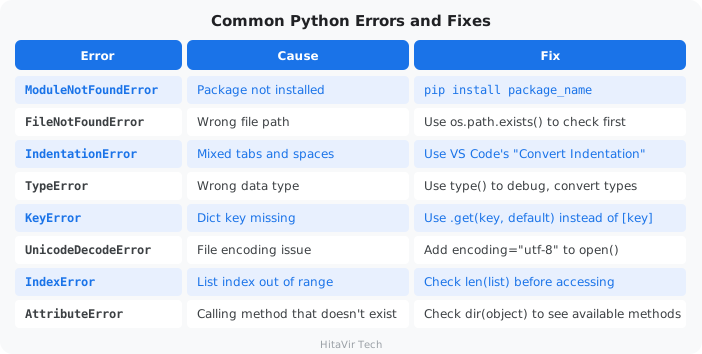
Windows-Specific Issues
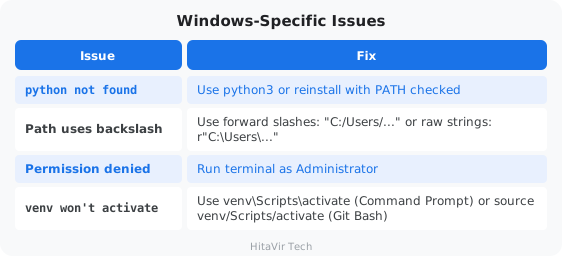
Debugging Technique — The Print-Statement Trick
# When something is wrong, add print statements to inspect the state:
print(f"DEBUG: variable = {variable}")
print(f"DEBUG: type = {type(variable)}")
print(f"DEBUG: len = {len(data)}")

# Or use Python's built-in debugger:
# python -m pdb your_script.py
Reading a Traceback
When Python crashes, it prints a traceback — the trail of function calls leading to the error. Read it bottom up:
Traceback (most recent call last):
  File "etl_pipeline.py", line 100, in <module>
    run_pipeline()
  File "etl_pipeline.py", line 80, in run_pipeline
    cleaned = transform(raw_data, ...)
  File "etl_pipeline.py", line 50, in transform
    record["price"] = float(record["price"])
ValueError: could not convert string to float: 'abc'
                                                ^^^^^
                                  This is the actual problem
HitaVir Tech says: "Every bug is a lesson. Read the error message carefully — Python tells you exactly what went wrong and on which line. The traceback is your best debugging friend."
What You Have Learnt on This Page
By the end of this page you should be able to confidently:
- Recognise the 8 most common Python errors by their names (
ModuleNotFoundError,KeyError,IndexError, etc.) - Read a traceback bottom-up to find the actual line that failed
- Fix Windows-specific issues (PATH, encoding, line endings, venv activation)
- Use
os.path.exists(),.get(key, default), andlen()checks before the failing call
PEP 8 — Style Rules to Apply Strictly During Debugging
Bugs hide in inconsistent code. Apply these rules every single time you debug:
- Use the
loggingmodule to print debug info — never leaveprint()calls behind - Catch specific exceptions —
except ValueError as e:notexcept Exception: - Always include the error variable in the log:
logger.error("Failed: %s", e) - Re-raise with
raise(no argument) to preserve the traceback - Run
flake8before hunting bugs — many "bugs" are linter warnings you ignored - Keep a clean repo —
black .first, then debug
Inspiration for the road ahead:
"Debugging is twice as hard as writing the code in the first place. Therefore, if you write the code as cleverly as possible, you are, by definition, not smart enough to debug it." — Brian Kernighan
These questions are frequently asked in Python Data Engineering interviews at companies hiring through LinkedIn, Naukri, Indeed, and at institutes like Simplilearn, Intellipaat, Coursera, DataCamp, Great Learning, and Scaler Academy. They cover the exact topics you learned in this codelab.
Category 1 — Python Fundamentals
Q1: What is the difference between a list and a tuple?
Answer: A list is mutable (can be changed after creation) while a tuple is immutable (cannot be changed). Lists use square brackets [], tuples use parentheses (). Use tuples for fixed data like database connection configs (host, port, db) and lists for collections that change like rows from a query result. Tuples are slightly faster and use less memory.
Q2: What are
*args
and
**kwargs
? Give a real example.
Answer: *args allows a function to accept any number of positional arguments as a tuple. **kwargs allows any number of keyword arguments as a dictionary. Real example: a database connection function uses **kwargs so callers can pass host, port, ssl, timeout — any combination without the function needing to define every parameter explicitly.
def connect_db(**kwargs):
    host = kwargs.get("host", "localhost")
    port = kwargs.get("port", 5432)
    # flexible — caller decides which params to pass
Q3: What is the difference between
==
and
is
?
Answer: == checks if two values are equal (same content). is checks if two variables point to the exact same object in memory (same identity). For data engineering: use == for value comparison, use is only for checking None (if value is None).
Q4: What are list comprehensions? Why are they preferred?
Answer: List comprehensions are a concise way to create lists from existing iterables. They are preferred because they are faster than traditional for loops (optimized internally by Python) and more readable for simple transformations.
# Traditional loop
results = []
for x in data:
    if x > 0:
        results.append(x * 2)

# List comprehension (faster, cleaner)
results = [x * 2 for x in data if x > 0]
Q5: Explain mutable vs immutable types with examples.
Answer: Mutable objects can be changed after creation: list, dict, set. Immutable objects cannot: int, float, str, tuple, frozenset. This matters in data engineering when passing data between functions — mutable objects can be accidentally modified by a function, causing bugs. Use tuples for data that must not change.
Category 2 — Data Handling and File I/O
Q6: How do you read a CSV file in Python? Compare csv module vs pandas.
Answer: The csv module is built-in and lightweight — good for simple row-by-row processing. pandas read_csv() loads the entire file into a DataFrame — good for analysis, transformation, and aggregation. For small files or streaming, use csv. For analytics and transformation pipelines, use pandas.
# csv module (row by row, low memory)
import csv
with open("data.csv") as f:
    reader = csv.DictReader(f)
    for row in reader:
        process(row)

# pandas (full DataFrame, powerful but uses more memory)
import pandas as pd
df = pd.read_csv("data.csv")
Q7: How do you handle missing values in a dataset?
Answer: Detect with df.isnull().sum(). Handle by either: (1) dropping rows: df.dropna(), (2) filling with default: df.fillna(0) or df.fillna(method="ffill"), (3) filling with statistics: df.fillna(df["column"].mean()). The strategy depends on business rules — for financial data, you might reject rows; for sensor data, you might forward-fill.
Q8: What is the difference between
json.load()
and
json.loads()
?
Answer: json.load() reads from a file object. json.loads() reads from a string. Similarly, json.dump() writes to a file, json.dumps() converts to a string. The "s" stands for "string."
import json

# From file
with open("config.json") as f:
    data = json.load(f)

# From string
data = json.loads('{"key": "value"}')
Q9: How would you process a 10 GB CSV file that does not fit in memory?
Answer: Use chunked reading with pandas: pd.read_csv("huge.csv", chunksize=10000) which returns an iterator of DataFrames. Or use the csv module for row-by-row processing. For production, use PySpark or Dask which distribute processing across multiple machines. You can also use generator functions with yield to process batches lazily.
Category 3 — Functions and OOP
Q10: What is a decorator? Give a data engineering use case.
Answer: A decorator is a function that wraps another function to add behavior without modifying the original. In data engineering, common use cases are: timing pipeline steps (@timer), retrying on failure (@retry(max=3)), logging function calls (@log_execution), and caching results (@lru_cache).
def retry(max_attempts=3):
    def decorator(func):
        def wrapper(*args, **kwargs):
            for attempt in range(max_attempts):
                try:
                    return func(*args, **kwargs)
                except Exception:
                    if attempt == max_attempts - 1:
                        raise
        return wrapper
    return decorator

@retry(max_attempts=3)
def fetch_data_from_api(url):
    # automatically retries up to 3 times on failure
    pass
Q11: What is the difference between
@staticmethod
and
@classmethod
?
Answer: @staticmethod does not receive self or cls — it is a utility function that lives inside a class. @classmethod receives cls (the class itself) and can create instances. In a data pipeline class, you might use @classmethod as a factory method: Pipeline.from_config("config.yaml") and @staticmethod for utility: Pipeline.validate_path(path).
Q12: What are generators? When would you use them in data engineering?
Answer: Generators use yield instead of return and produce values lazily — one at a time, without loading everything into memory. Essential for processing large datasets, reading database cursors row-by-row, or streaming data. They are memory-efficient because only one item exists in memory at a time.
def read_batches(filepath, batch_size=1000):
    batch = []
    with open(filepath) as f:
        for line in f:
            batch.append(line)
            if len(batch) == batch_size:
                yield batch
                batch = []
        if batch:
            yield batch
Category 4 — Error Handling and Production Code
Q13: How do you handle errors in a production data pipeline?
Answer: Use try-except blocks with specific exception types (never bare except:). Log errors with the logging module (not print). Implement retry logic for transient failures (network, database timeouts). Use finally blocks for cleanup (closing connections). Store failed records separately for investigation rather than silently dropping them.
Q14: What is the difference between
raise
and
raise from
?
Answer: raise re-raises or creates an exception. raise NewError() from original_error chains exceptions — preserving the original traceback while wrapping it in a more meaningful error. This is useful in pipelines to add context: "Failed to process batch 42" while still showing the original "Connection refused" error.
Q15: How do you implement logging in Python?
Answer: Use the built-in logging module with appropriate levels: DEBUG for development, INFO for normal operations, WARNING for unexpected but handled situations, ERROR for failures, CRITICAL for system-level failures. Configure with basicConfig() or handler-based setup for file + console output. Never use print() in production pipelines.
Category 5 — pandas and Data Transformation
Q16: What is the difference between
loc
and
iloc
in pandas?
Answer: loc selects by label (column names, index labels). iloc selects by integer position. df.loc[0:5, "name"] selects rows 0 through 5 of column "name" (inclusive). df.iloc[0:5, 0] selects the first 5 rows of the first column (exclusive of end).
Q17: How do you merge two DataFrames? Explain join types.
Answer: Use pd.merge(df1, df2, on="key", how="inner"). Join types: inner (matching rows only), left (all from left, matching from right), right (all from right), outer (all from both). This mirrors SQL JOIN behavior. Use left when you want to keep all records from your primary table and enrich with data from a lookup table.
Q18: How do you handle duplicate rows in pandas?
Answer: Detect with df.duplicated().sum(). Remove with df.drop_duplicates(). For specific columns: df.drop_duplicates(subset=["email"]). Keep first or last: df.drop_duplicates(keep="last"). In data engineering, always check for duplicates after merging datasets or loading incremental data.
Q19: What is the
apply()
function in pandas?
Answer: apply() runs a function on every row or column of a DataFrame. Use it for custom transformations that cannot be done with built-in pandas methods. It is slower than vectorized operations but more flexible.
# Apply to each row
df["full_name"] = df.apply(lambda row: f"{row['first']} {row['last']}", axis=1)

# Apply to a column
df["category"] = df["price"].apply(lambda p: "Premium" if p > 500 else "Standard")
Q20: What is the difference between
groupby().agg()
and
groupby().transform()
?
Answer: agg() returns a reduced DataFrame (one row per group) — used for summary reports. transform() returns a DataFrame with the same shape as the original — each row gets the group's aggregated value. Use transform() when you need group statistics as a new column alongside individual rows.
# agg: one row per region (summary)
df.groupby("region")["revenue"].agg(["sum", "mean", "count"])

# transform: adds group mean to every row (enrichment)
df["region_avg"] = df.groupby("region")["revenue"].transform("mean")
Category 6 — Architecture and Best Practices
Q21: How do you structure a Python data engineering project?
Answer: Use a modular structure separating concerns: src/ for source code (extract.py, transform.py, load.py), config/ for environment configs, tests/ for unit tests, data/ for input/output (gitignored), logs/ for pipeline logs. Include requirements.txt for dependencies, .gitignore for secrets and data files, and README.md for documentation.
Q22: What is the difference between a virtual environment and a conda environment?
Answer: Both isolate project dependencies. venv is built into Python, lightweight, and uses pip. Conda manages both Python packages and non-Python dependencies (like C libraries), and can manage Python versions. For data engineering: use venv for pure Python projects, use conda when you need complex scientific libraries (NumPy with MKL, CUDA for GPU).
Q23: How do you make a pipeline idempotent?
Answer: Idempotent means running the pipeline twice produces the same result. Techniques: use INSERT ... ON CONFLICT DO UPDATE (upsert) instead of plain INSERT, use CREATE TABLE IF NOT EXISTS, delete-then-insert for full refreshes, use partition overwriting for incremental loads, and always use deterministic transformations (no random values without seeds).
Q24: What is the difference between ETL and ELT?
Answer: ETL (Extract-Transform-Load) transforms data before loading into the warehouse — used when compute is cheaper at the pipeline level. ELT (Extract-Load-Transform) loads raw data first and transforms inside the warehouse — used with powerful cloud warehouses like BigQuery, Snowflake, Redshift that can handle heavy SQL transformations. Modern data engineering favors ELT.
Q25: How do you handle secrets (passwords, API keys) in Python projects?
Answer: Never hardcode secrets in source code. Use environment variables (os.environ["DB_PASSWORD"]), .env files with python-dotenv (gitignored), or secret managers (AWS Secrets Manager, Azure Key Vault). Always add .env and credential files to .gitignore. In CI/CD, use pipeline secrets (GitHub Secrets, GitLab CI Variables).
Interview Preparation Tips
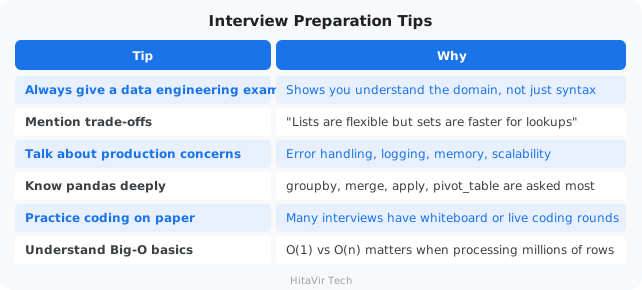
HitaVir Tech says: "These 25 questions cover 90% of what you will face in a Python Data Engineering interview. But knowing the answer is not enough — practice explaining them out loud. An interview is a conversation, not a written exam."
What You Have Learnt on This Page
By the end of this page you should be able to confidently:
- Answer the 25 most-asked Python DE interview questions with concrete examples
- Walk through trade-offs (list vs. tuple,
==vs.is, append vs. extend) - Explain pandas operations (
groupby,merge,apply,pivot_table) under pressure - Demonstrate production-grade thinking — error handling, logging, idempotency
- Handle secrets correctly (
.env, env vars, never in code)
PEP 8 — Style Rules to Apply Strictly in the Interview Itself
Whiteboards and shared editors are where interviewers judge your discipline. Apply these rules every single time:
- Indent with 4 spaces even on a whiteboard — never sloppy 2-space pseudocode
- Name functions and variables in
snake_caseout loud as you write - Open every function with a one-line docstring:
"""Return the top customer.""" - Verbalize type hints when you write a signature
- Catch a specific exception, not
except Exception:— interviewers notice - After "I'm done", say: "In production I'd run this through
blackandflake8."
Inspiration for the road ahead:
"Talk is cheap. Show me the code." — Linus Torvalds
Congratulations! You have completed Python for Data Engineering by HitaVir Tech!
What You Mastered
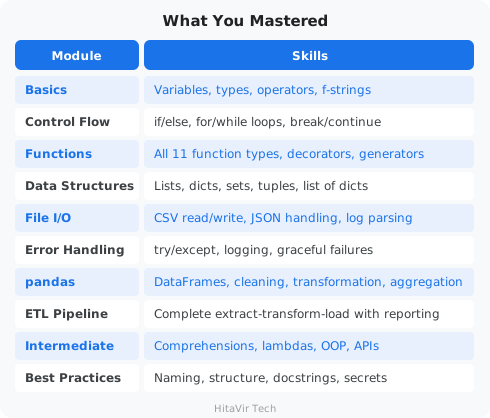
What to Learn Next
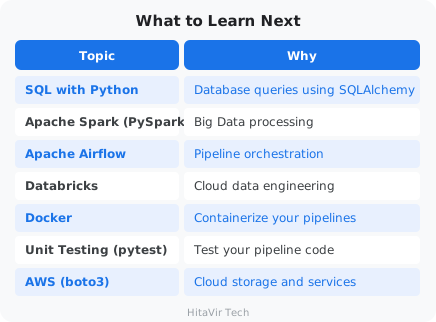
The Data Engineer Learning Path
+----------------------------------------------+
|  Python Basics (you finished this codelab!)  |   <-- you are here
+----------------------------------------------+
                       |
                       v
+----------------------------------------------+
|  SQL + Database Design                       |
+----------------------------------------------+
                       |
                       v
+----------------------------------------------+
|  pandas + Data Transformation                |
+----------------------------------------------+
                       |
                       v
+----------------------------------------------+
|  Apache Spark (PySpark)                      |
+----------------------------------------------+
                       |
                       v
+----------------------------------------------+
|  Airflow (Pipeline Orchestration)            |
+----------------------------------------------+
                       |
                       v
+----------------------------------------------+
|  Cloud Platforms (AWS / Azure / GCP)         |
+----------------------------------------------+
                       |
                       v
+----------------------------------------------+
|  Databricks + Delta Lake (production scale)  |
+----------------------------------------------+
HitaVir Tech says: "You now have the Python foundation that every data engineer needs. The language is your tool — data is your mission. Go build pipelines that move data, transform businesses, and create value."
What You Have Learnt Across This Codelab
By finishing this codelab you have proven you can confidently:
- Set up a professional Python environment on Windows (Python, pip, VS Code, venv)
- Apply PEP 8 rigorously across every concept — variables, control flow, functions, files
- Use all 5 core data types and all 4 data structures fluently
- Build production-grade ETL pipelines with logging, error handling, and config
- Wield pandas for cleaning, transformation, and aggregation at scale
- Write OOP, comprehensions, lambdas, decorators — the Pythonic toolbox
- Speak about your code in interviews using DE-specific examples
PEP 8 — Your Lifelong Engineering Habit
This is not the end of the style journey — it is the start. From this codelab onward, every repo you push to GitHub, every PR you open, every notebook you share will be:
black-formatted before commit (no exceptions)flake8-clean with zero warnings- Documented with docstrings and type hints
- Free of magic numbers, bare excepts, and hardcoded secrets
Inspiration for the road ahead:
"The journey of a thousand miles begins with a single step. You have just taken thousands." — Adapted from Lao Tzu
You have successfully completed Python Programming for Data Engineering by HitaVir Tech!
What You Built
- A complete development environment
- Multiple hands-on Python scripts (one per concept)
- A production-quality ETL pipeline with logging and error handling
- Data cleaning and transformation workflows
- Automated report generation
Your Files
python-de-learning/
├── venv/
├── requirements.txt
│
├── test_setup.py
├── basics_variables.py
├── basics_types.py
├── basics_operators.py
├── basics_input.py
├── control_if.py
├── control_loops.py
├── func_01_basics.py
├── func_02_defaults_kwargs.py
├── func_03_args.py
├── func_04_kwargs.py
├── func_05_advanced.py
├── func_06_pipeline.py
├── data_structures.py
├── create_sample_data.py
├── file_csv.py
├── file_json.py
├── file_logs.py
├── error_handling.py
├── pandas_basics.py
├── intermediate.py
├── best_practices.py
│
├── assignment_00_pep8.py            <-- Style refactor drill
├── assignment_01_basics.py          <-- Pipeline Stats Calculator
├── assignment_02_control.py         <-- Data Quality Gate
├── assignment_03_functions.py       <-- Reusable Validation Toolkit
├── assignment_04_data_structures.py <-- Sales Aggregator
├── assignment_05_files.py           <-- CSV to JSON Region Report
├── assignment_06_errors.py          <-- Bullet-Proof CSV Reader
├── assignment_07_pandas.py          <-- Daily Sales Report
├── assignment_09_intermediate.py    <-- Pythonic refactor
│
├── pipeline_project/                <-- Capstone (Assignment 8)
│   ├── etl_pipeline.py
│   ├── input/sales_raw.csv
│   ├── output/
│   └── logs/
└── (data files created during exercises)
Assignment Tracker — Tick Each One Off
+---------------------------------------------------------------+
|  [ ]  Assignment 0  -  Style-Refactor Drill                   |
|  [ ]  Assignment 1  -  Pipeline Stats Calculator              |
|  [ ]  Assignment 2  -  Data Quality Gate                      |
|  [ ]  Assignment 3  -  Reusable Validation Toolkit            |
|  [ ]  Assignment 4  -  Sales Aggregator                       |
|  [ ]  Assignment 5  -  CSV to JSON Region Report              |
|  [ ]  Assignment 6  -  Bullet-Proof CSV Reader                |
|  [ ]  Assignment 7  -  Daily Sales Report with pandas         |
|  [ ]  Assignment 8  -  Extend the ETL Pipeline (capstone)     |
|  [ ]  Assignment 9  -  Refactor Assignment 4 (intermediate)   |
+---------------------------------------------------------------+
When all 10 boxes are ticked, you have a portfolio of working pipeline code you can show in any DE interview.
Keep coding, keep building pipelines, and keep growing with HitaVir Tech!
What You Have Learnt — and What You Carry Forward
You now own a complete portfolio of working Data Engineering code:
- A production-quality ETL pipeline with logging, validation, and reporting
- 10 hands-on assignments covering every Python concept used in the field
- A virtual environment and project structure you can reuse for any new pipeline
- PEP 8 muscle memory — you no longer think about indentation, naming, or imports
PEP 8 — One Final Promise to Yourself
Before you close this codelab, commit out loud:
- "I will never push code that has not been formatted with
black." - "I will never push code that has not been linted with
flake8." - "I will write docstrings and type hints — every function, every time."
- "I will treat every code review as a chance to learn, not a defence."
Inspiration for the road ahead:
"The only way to learn a new programming language is by writing programs in it." — Dennis Ritchie, creator of C
You did exactly that. Now go build pipelines that move the world.
Happy engineering!